Showing posts with label Free Downloads. Show all posts

Saturday, 24 December 2016

How to Watch Satellite Subscription Programs Free Of Charge

Entertainment comes with a price. Even the very basic of home entertainment using TV is not free. In my location we pay a license to own one and another subscription to top up the free to view channels to watch decent programs. And depending on the package, it could mean a hefty chunk of the monthly budget.

But with the high speed internet already available, coupled with gadgets and brilliant apps makers, it could mean some savings to your monthly entertainment budget for some popcorn during a marathon movie night.

Here's what you need and how to set-up.

  • An android tablet or mobile phone with at least OS 4.1 (Jellybean) or above. The latest is better. You can check the OS by going to Settings>General>About Device>Android Version


  • Using your android mobile phone, download the application at https://www.mobdro.com/ . Do not stray away from this site as the others will lead you to a never ending link of advertising. See screenshot of the site below and click download the app.


  • Once dowloaded and before hitting install, make sure that your device is authorized to install unknown applications by going to Settings>General>Security>and tick Unknown Sources


  • And also make sure that the minimum requirement Android 4.1 or above is onboard your mobile or tablet.Otherwise a parse error message will display and the installation will not be complete.

  • Successful installation will not ask you for additional setup and will work straight away. Now you can enjoy a wide variety of cable and satellite programs from movies to sports and other international channels for free.

  • Enjoy and merry xmas to all!


Wednesday, 15 July 2015

How To Get Premium Applications For Free

The heart and mind of every smartphone is the application. That what makes it smart, otherwise it is just a concoction of plastic and metals put together by soldering wires in a PCB. Although the make and the on board native apps count, there are still many things missing on it, depending on a user's specification and how he use this amazing device.

Premium applications are not that expensive to be honest, but because there are many of them out there that can perform the same tasks as the others, it is hard to select  which one is the best for the task. So you may end up spending more in buying and trying each application. And buying a digital property like this may not entitle you for a refund in case you find out it is not what you need. .

So the best way to try a premium application and avoid wasting money in case you decide not to keep this is  to get it for free. You might have come across sites that are promising free applications but could be dodgy specially on sources that are not popular. They could still give you the free application but most often can winth a bundled useless software with it. 

At the end you get the free application and the harmful one. So  here are ways to get it legally and safely.

1. From Amazon(Android)


  • First thing is to download the amazon from http://appamazon.com/mobileapps  from your android mobile.
  • Get to the discounted applications by clicking the link below as the 'special discount' link(1) is not normally showing at the drop down menu.


  • The free application link is accessible using the navigation at the left(2). 


2. Use Free App of the Day(Android)

As the name suggests there is a premium app everyday free of charge. 
  • Download app of the day from play store.
  • Visit everyday for the free app of the day.


3. Apps Gone Free(iOS)


Apple users can go to this link for free premium apps. The free apps do not remain gratis but it is time limited. Usually, developers from time to time,  make their paid apps free temporarily to generate a boost in downloads.


Last Words.


Although you can not choose the specific title you want, you can use the search function of each to show you the best alternative to the one you are looking for. Using these sites can save you a lot of money specially when you tend to experiment on premium applications.

As the free apps are not free forever, download and try whilst you still can!

Sunday, 4 November 2012

Edit Mobile Videos With FreeMake

Download Freemake Video Converter
Do you take videos with your phone? I usually do, because mobiles are more handy to bring along than a proper video camera. But most of the time I am not aware that it is up-side-down or tilted to the left or to the right when I use it. Who cares, specially when I only play it back with the phone I took the video with. I am confident that it will be corrected automatically with the auto rotate function of the phone later during playback.

The problem arises when I try to upload it online. The resulting video will be tilted to the right and there's nothing the viewers can do than to tilt their heads inline with the video's orientation. There is a basic built in video editor in my phone that can do the job of correctly reorienting the video, but there is a free program that can do this and can do more. It is a free program that can be downloaded for windows or apple. It is easy to use and can output the edited video into popular formats and has a button to upload it into social networks straight away.

Editing Videos with Freemake Video Converter

The most common problem when you are shooting a video with your mobile is the orientation of the resulting clip. Most often, the video is tilting sideways when you shoot a clip with the phone upright. Freemake can help you easily reorient the movie correctly.

1. After download of the software(just click the logo above ) the first step is to transfer the mobile phone movie to your computer where the Freemake Video Converter software is installed. 

2.Then open up the software, click Video+, go to the directory of the movie and select it from there. It should register in the software's interface.


3. The next step is to trim the movie by clicking on the editing room button(1).This will get you into the editing mode where you can cut the part of the movie you do not want. To cut or discard a part of the movie, slide the button of the time line to the part you want to discard and click the first scissors button(2). This will mark the beginning of the part you do not like. Then move the timeline button up to the part that you do not like, then click the last scissors icon(3). This will mark the end of the cut. Then click the third scissors button to delete the selected scenes(4).

Do it again on the parts you want to discard.


4. After trimming and discarding the parts you did not want, re-orient your video by rotating it into 90%  clockwise by clicking the CW button, or CCW if the video is rotated the other way. Do not forget to click OK to save the changes.


5. Now you are ready to convert the video. Click on the convert button and choose which format you want. If you want to play your video into a another portable devices like PSP, iPhone, iPad, iPod,  and others,  choose MP4. After conversion, you can load the converted file and upload it to youtube, or transfer it to any device. 


There is also an option to upload your videos straight away to youtube. Personally I prefer to convert it first  into mp4 before uploading because I find it faster.


Why convert? 

Raw videos taken from a HD or high frame rate smart phones are much larger in size and if you upload these videos without converting first could take sometime, as the website you upload to will still do the conversion  into smaller package. 

Converting them into smaller sizes can reduce the upload time significantly and reduce the time before your videos become live or ready to view.

6. If the cutting of your videos resulted in creating many clips, or you want to join other clips in one continuous video, just open them all in the freemake's interface and turn on join clips, click convert and choose your conversion parameters!


The resulting clip edited with Freemake showing some clips during the launch of the Windows 8 phone in London with my "borrowed" identity!

Friday, 21 September 2012

BitDefender Total Security 2013

This is a Sponsored post written by me on behalf of Bitdefender for SocialSpark. All opinions are 100% mine.

Do you bank or  buy something online? There's a threat for that. This includes phishing attempt and key logging attacks, that can steal your banking account details. Do you Facebook and Tweet? I am sure you do. There's a threat for that as well. Like scam posts, free item scams and innocent looking applications from scheming coders and authors. 

Whatever their purpose is, one thing is for sure. It's not for anyone's advantage, but for everyone's disadvantages. 

These threats  are the enemies of every internet user's security that can affect and discourage the activities they could have been doing online.  The convenience of the internet is without a challenge  from the inconveniences of many online threats.
What's defending you from all of these?
BitDefender is one of the many  excellent internet security suites around. It is an all in one package in providing and defending your computer againsts all kinds of threat. The only distinct difference of this product among others is, according to AVtest review, it is the best in providing internet security and have been  chosen number one in two consecutive years, 2011 and 2012. Not only at AVtest, it bagged the number one spot for AntiVirus Software in CNET Editor's Choice and PCMag Editor's Choice as well. With the improvement of the new  2013 edition, it might get the top award for the next year again. 
Features
Auto Pilot. 
Useful for not so tech savvy like me. This provides security without the user's input. No matter what level  your IT knowledge is, you are assured that you are protected when this is turned on. The software scans data pockets and destination links then decide an action without lifting a finger. It's intelligence to make a decision comes from the data base in the "cloud", which is updated regularly. This means new threats are detected before they can do what they are designed to do. Another plus is, your computer does not suffer from slowdown when it is silently doing it's job.


Safepay.
Another security enhancement especially when banking online. When this is enabled, the software detects when you are logging into a bank website. It will prompt you to open a new browser where you will do your transactions securely. You can even choose to use a virtual keyboard to enter your details, rather than using the physical keys. This is another layer of protection to key loggers.


Anti theft. 
The application is not only limited to virtual thieves but can protect your devices running the application from real thieves, in case you become a victim. You can wipe out the data stored with in, or lock your device remotely by going online or by just by sending a preprogrammed text from another phone, in case you can not go online . 


In case you just misplaced your phone or tablet running BitDefender, it can help you find it faster by  making the device's alarm to play


Social Network Protection.
 Facebook and tweeter are the most popular social networks at the moment, and millions are using it daily to show what they are doing, share what they have seen and vice versa in just a few easy clicks. As it is so easy to share anything, it is also easy to receive such threats  hidden on links or shared apps. Bit defender scans and filters these links, and block them when they pose a threat.


Parental Control Options.
With the popularity of the always on internet and the ability to get access anywhere, BitDefender can be set to restrict internet access at a specific time. This is helpful to control the amount of internet time for the kids. You can remotely see what your kids are seeing online and the possibility  to block the sites or contents you do not want your kids to access. 


My Thoughts
Thousands of threats are being created each day, and the people behind these are also becoming clever in the way they implement their attacks and the way they design these threats. And once your device becomes infected, the possibility of losing something or being robbed virtually becomes even greater. Prevention is always the first and the better way to fight those online threats. Installing an antivirus and a total internet protection is therefore a must.

Bitdefender

Download the newest Bitdefender Total Security 2013 and get it 50% for a limited time until the 30th of September.  You can also have the chance to win a Dell Inspiron laptop just by liking BitDefender on facebook. For your chance to win and more details of this promotion, visit 


Visit Sponsor's Site

Wednesday, 5 September 2012

Advance IP Scanner


Have you secured your wifi network yet?

I am still surprised that some friends have not  secured their wifi settings. Their reason is they do not know how to get into their router settings. Others are afraid to fiddle with their wi-fi settings that they thought they  might mess up and cause interruption to their internet service. Others do not know their default router address and default router log in and password. They even say that using the existing default gateway when typing ipconfig on a command prompt does not bring up the router's log in page. I find this comment rather weird as I have not experienced before.  I always arrive at my router's log in page using my default gateway address. So it might be a technical problem with their device, or my friend's lacking in technical ability.

Not getting into the router's innards means not knowing which devices are attached to it wirelessly. And if an unknown device is attached without you knowing, then that device is stealing some of your traffic and causing slowdown on your connection. This is the reason why you need to get into your router's wireless settings and secure it as much as possible.

But if you can not really get into your router's wireless setting for some reasons and want to know whose or what devices are connected into your wireless router without logging into your router's setting, then this application is recommendable.

Advance IP Scanner

This application can help determine, which devices are connected into your wi-fi without logging into the router's home page. Download the application from

http://www.advancedipscanner.com

The interface is very simple and easy to follow.

Once launched, you can just start scanning by pressing the green arrow. The IP addresses to be scanned are already pre configured.


What does it do?

1. Shows the connected devices.

The program scans your network and shows all the connected devices, whether it is yours or your neighbours.

2. Determines the default gateway address

 It even identifies the router's gateway ip address and translate in into a readable address instead of numbers. This means you can type in www.routerlogin.com instead of the usual http://192.168.0.1.  This time the scanner has seen six active devices connected into the wi-fi.

3. Shows the MAC addresses of each the connected devices

You can identify the devices that are not yours by simply checking their names and if the name looks suspicious, by their Mac Addresses. To know how to get your MAC address of your devices please see previous post at


If you recognise them all, then there is no device leeching on your wifi.


4. File sharing medium

The shared folders on a connected computer can also be shown and browsed using the application.


5. Shutdown connected devices.

On connected computers, you can also remotely shut them down, wake them up or do a file transfer as long as you have radmin running on both of the computers. Video on how to do this at the end of this post.


This application is very useful indeed, and can be a great help to the faint heart to determine if they are sharing their wifi connection without their knowledge.


Thursday, 30 August 2012

Vipre!

This is a Sponsored post written by me on behalf of GFI for SocialSpark. All opinions are 100% mine.

Viruses, malwares, and other threats has been the sources of unpleasant experiences online. In fact they make us  limit our online activity. I know some friends that lost money whilst banking online, and others that were victimised by hackers and lost their email accounts. Others experienced a slowdown in their computer's performance, owing most of this from viruses, malwares and other threats.

Did my friends have antiviruses? Yes they do, a copy of an internet security suite provided when they purchased their machines, which I suspect as trials only and might have been expired and no longer update the important  definitions.

They might have thought that what they have is enough until it's a little bit late.  It is very important to have antivirus, whether a premium one or not, as long as it continue to update the things it is protecting it from. It is  like wearing a helmet before riding  a bike.


Antivirus needs definitions updating to become immune or effective to known threats. Like our own immune system, we need to be exposed to the virus to form antibody against it. Or we need to have a shot or immunisation. Immunisation sometimes causes discomfort in our body as a consequence. In computers, whilst antivirus is updating its definitions, a "discomfort" may also occur, like performance slowdown, caused by high resource usage of the updating antivirus.

 In my experience, I encountered the same problem like sluggishness in my system when the antivirus updates and also when it do the sceduled scan. This means that whilst the antivirus is doing it's things, productivity is affected, and there's nothing more sensible to do  than make a coffee for myself and wait until the update is finished. And further delay happens when it starts scanning, this time I can make a coffee for myself and for my wife, and chocolate for the kids, with a little chitchat before I can use the computer again!
 Did you also experience this? I guess you did at some point.

The Vipre
Vipre antivirus is very different from the others I have used before. Although I can say that the previous antiviruses has done their job in protecting my computer, this antivirus stealthily does its things. Vipre scan your computer without slowing down your system. This means you can continue what you are doing online whilst it is searching for malwares and viruses in your system. The program also silently fetches or updates virus definitions without you noticing. Another good thing is the update can be set to every hour to refresh and look for new definitions for optimum protection. This boost my confidence of doing things online  because I know my computer is protected from the newest possible viruses or threats.


 If you regularly import or access files from other computers with USB sticks or other memory cards, or you allow your friends to use your computer to see their files on a USB stick, chances are there might be hidden threats in those storages that can create havoc in your system and you don't notice it before it's too late. With the Vipre, you will feel more secure and confident that threats from portable storages will be screened and blocked before they can enter your system. An option to automatically scan any attached USB device on your computer is built in. You just need to tick to perform automatic scanning.


The scan can be scheduled any time and any day without complicated settings. Just choose the day and tick the time and it does this automatically.

There are also other built in tools to play with that can give further online security, like secure file eraser, history cleaner and pc explorer.

And not only these extras, Vipre is also designed to protect and look for rootkits, trojans, worms, keyloggers, dialers, adwares, and malicious scripts. A true all in one protection indeed. 


Don't just take it from my experience, you can try it yourself. It is very easy to download the 28.2MB installation files and the installation is quite quick. It is recommended to disable or uninstall the existing antivirus before installing Vipre.


And just in case you run into trouble using the software, a US based customer service is free and always available. For further information about this product, go to their site at vipreantivirus.com.

Visit Sponsor's Site

Sunday, 8 July 2012

Convert Youtube Videos Into MP3's


Video hosting websites like  youtube has a lot of resources which are free to watch and free to download.  We can also change the format of the download for our mobile devices to read and play. Like the music videos we watch online, can be converted  into mp3's for our mp3 players or mobile phones. This is quick and easy when you know how. Even when you have the idea of conversion, the availability of free softwares to convert files can be difficult task. Using which software to use is just another hit and miss thing in terms of the outcome the software produces . Free softwares that can do this like the premium ones but in return you need to do something for the developer or  publisher like signing upto something you do not want, participating in a long survey and at the end you give up because it's lengthy. Sometimes you are forced to install other softwares not related to what the software does. And in other situations, the user does not even know other softwares are bundled with it.  The worst thing is the stealth softwares can hijack your browser and redirect you from rogue sites. 

The software I use to convert youtube videos into mp3 is from freemake, you can get this at www.freemake.com. I have been using this and do not have a problem with it. This free software is bundled with other programs, but you  do have the option to decline. So just be careful during installation, if you do not want to get additional programs, which can change the way you use your browser. How not to get this extras and how to convert youtube videos into mp3's using the software? The processes below.

1. Go to www.freemake.com and download the video converter.


2. During the installation, choose Costum Installation and untick all the 3 items below it.


3. Go to you tube and search for the music video you want to convert into mp3. Highlight and copy the url typed at the address window.


4. Open up freemake video converter and choose paste URL, then choose mp3 as the resulting file type.


5. Choose a destination folder and click convert


6. Convertion process begins


With this tool, you can download and convert all of your favourite music found in youtube. As this is a free software, other bundled applications with the free converter might change but always remember to take a closer look at what the installation process is saying  and refuse to install what other softwares is bundled with the product if you only want the converter.


Download Free Digital Contents from iTunes and Amazon


Phones became the ultimate "companion" for most of us. We can go out our houses without almost anything, but can not leave home without our mobile phones. It's second to our wallet in terms of importance, and  It feels like something is missing without it. Not just because it can be the ultimate lifeline saviour in an emergency, like being stranded in  strange places, car breakdown, or in a real life and death situation, but also a source of entertainment when on the go.

Movies, games and music, anything digital that the device can playback can be downloaded free. But most of the freebies, especially games, are just tasters. Movies and  music can be loaded into your device free of charge when you know how to convert them into digital formats your device can decode. Or download it free when you know where to go. But free downloads offered by non popular sites can be incomplete or of low quality. 

Music downloads are not that expensive, but it can be, depending on how popular and how many tracks you want to put into your device. A thousand music at 30 pence for example, will cost you back at least  £300. That's only an estimate for unpopular the music tracks. Popular artist's work can fetch at least .99 pence.

But did you know that  there are free music downloads offered by amazon and itunes? Here's how to get them.

The Free Downloads

1. Free music download from amazon

Go to Amazon MP3 section here!

Then click free under bargains category to see the latest freebies. Then just complete your order by adding your selection into the basket before you can download it.


2. Free downloads from itunes

iTunes offers freebie downloads as well, from music, books, to videos. Although it is harder to tell which category has it's freebies, you can see the items at the right side of the itune's interface.


There's a handy blog to keep track of the itune's freebies at http://freeitunessongs.blogspot.co.uk/


Sunday, 20 November 2011

Free Portable Apps

Portable applications are useful especially when travelling or using different computers when on the go. Chances are, the computer or laptop you will be using or borrowing doesn't have the apps that you usually use that is inside your own PC or laptop. Good news is there are "USB apps", programs that can fit into a USB key memory that can be loaded from the USB to any PC or laptop. Below are the hand picked apps!


Supported operating systems:
Windows 98 / 98SE / ME / 2000 / XP / 2003 / Vista / 7, each 32-bit and 64-bit,

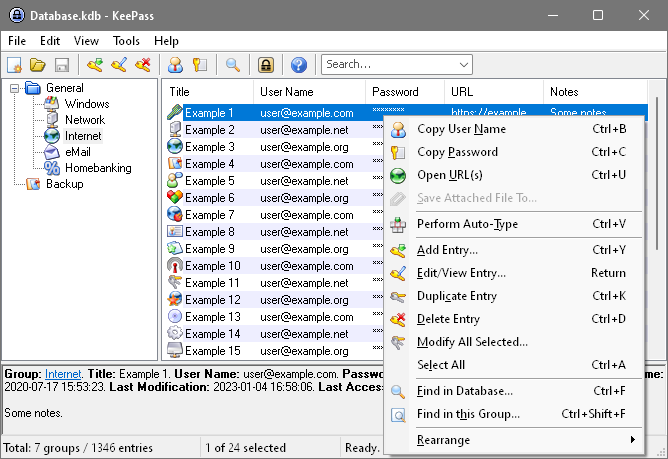
This handy little program uses a master password to safeguard all your valuable login information. Once passwords have been stored, they can be dragged and dropped into text boxes to save having to retype them in future.


System Requirements: 
Windows 2000/XP/Vista/7, WINE on Linux/UNIX 

My personal favourite, no computer would be complete without a file-zipping utility. 7-Zip Portable is not only compatible with the ZIP format, but also RAR, ISO, CAB, ARJ and many more, so almost every compressing eventuality is catered for.


System Requirements: 
Windows 2000/XP/Vista/7, Wine on Linux/UNIX

Tabbed browsing is still present, as is support for extensions, and being able to store Bookmarks on a USB drive makes it easy to access all your favourite websites from any computer with an internet connection. It’s not only portable but lightning fast too.


Another personal favourite is the  GIMP. It has has earned itself a deserved reputation as one of the best free image editors around. The portable edition of the program packs the same punch as the Desktop version, letting you work with a wide variety of image formats.


ClamWin Portable

System Requirements: 
Windows 2000/XP/Vista/7


ClamWin Portable is the popular ClamWin antivirus packaged as a portable app, so you can take your antivirus with you to scan files on the go. You can place it on your USB flash drive, iPod, portable hard drive or a CD and use it on any computer, without leaving any personal information behind.


Spybot Search and Destroy


System Requirements: 
Windows 2000/XP/Vista/7

Spybot - Search & Destroy® detects and removes tens of thousands of spyware and similar malware from PCs. It can also clean usage tracks and fix registry issues. Spybot is freeware for personal use. Many cleaning and immunization features require admin rights, which will be requested on launch.


Libre Office Portable


System Requirements: 
Windows XP/Vista/7, Wine underLinux/UNIX/Mac

LibreOffice Portable is a full-featured office suite  including a word processor, spreadsheet, presentation tool, drawing package and database, packaged as a portable app, so you can take all your documents and everything you need to work with them wherever you go.


Portable Apps Suite


PortableApps.com Suite™ is a complete collection of portable apps including a web browser, email client, office suite, calendar/scheduler, instant messaging client, antivirus, audio player, sudoku game, password manager, PDF reader, minesweeper clone, backup utility and integrated menu, all preconfigured to work portably. Just drop it on your portable device and you're ready to go.

All versions of the PortableApps.com Suite include the integrated PortableApps.com Menu (pictured at right) and the PortableApps.com Backup utility along with a set of custom icons, an autoplay configuration, folders and a quick start shortcut. In addition, the packages include:
 Mozilla Firefox, Portable Edition (web browser)
 Mozilla Thunderbird, Portable Edition (email)
 Mozilla Sunbird, Portable Edition (calendar/tasks)
 ClamWin Portable (antivirus)
 Pidgin Portable (instant messaging)
 Sumatra PDF Portable (PDF reader
 KeePass Password Safe Portable (password manager)
 Sudoku Portable (game)
 Mines-Perfect Portable (game)
 CoolPlayer+ Portable (audio player)
 PNotes Portable (notes)
 OpenOffice.org Portable* (office suite)
     - Writer (word processor)
     - Calc (spreadsheet)
     - Impress (presentations)
     - Base (database utility)
     - Draw (drawing)


Monday, 7 November 2011

Top Free Softwares

Burning Software


CDBurnerXP is a free application to burn CDs and DVDs, including Blu-Ray and HD-DVDs. It also includes the feature to burn and create ISOs, as well as a multilanguage interface. Everyone, even companies, can use it for free. It does not include adware or similar malicious components.

Key Features

burn all kinds of discs
audio-CDs with or without gaps between tracks
burn and create ISO files
data verification after burning process
create bootable discs
multi-language interface
bin/nrg → ISO converter, simple cover printing and much more!
Operating Systems: Windows 2000/XP/2003 Server/Vista/2008/Win7 (x86 / x64)

Download at


BurnAware Free is a full-fledged disc burning tool – fast, lightweight, feature-packed and, most importantly, 100% free. The program burns all types of CD, DVD and Blu-Ray discs containing data, digital photos, music and video. With BurnAware Free, you will be able to create bootable or multisession CDs and DVDs, high-quality audio CDs, make and burn disc images, copy and backup discs.


The software supports the most popular Windows versions, including NT/2000/XP/Vista/7


Download at


The Ashampoo Burning Studio 6 FREE keeps all the advantages of its predecessor and adds multi-disc file backup, an integrated audio CD ripper and further improved support for the exciting new Blu-ray format with capacities of up to 25 gigabytes per layer.

Many users are tired of over-complicated CD burning applications that are getting harder and harder to use. Sometimes you can waste most of your time just trying to find a function. Ashampoo Burning Studio 6 FREE focuses on what you want: To burn discs quickly, easily, with maximum quality and minimum hassle. It includes everything you need to be able to do that. And it excludes everything that could get in the way.

Operating Systems: Microsoft Windows XP, Microsoft Windows Vista, Microsoft Windows 7

Download at


google.com, pub-9356159227116695, DIRECT, f08c47fec0942fa0

ShareThis

Popular Posts