Showing posts with label Hacked Email. Show all posts

Sunday, 27 December 2015

Know If Your Account Has Been Hacked

The sites we visit mostly ask for our details and create an account before we could use their service or view contents. We think that there is no problem of sharing our information. What could go wrong is beyond our imagination, but for a hacker, personal information is a valuable treasure that they can mine and exploit for their own gain.

Email, usually is our form of identification to this sites, and the worrying part is, as we usually use  the same email and  password across the sites we create our accounts. Websites can vary in terms of security, and even the most secure ones can be vulnerable to an attack from a persistent and creative hacker.

Another problem that add to this is well known sites are keeping this a secret until they have solved their security problem and the days that they keep this a secret is enough for the costumer's information to be leaked.

Thankfully, there are several online sites that can tell whether your email and password are compromised. These site are very easy to use, just type the email or user id and you will be alerted if there was a breach in your account.

See if you've been hacked at


Once you are at the site, just type your email or user name and hit the return button. Below is the result of my user name that made me change my password straight away.
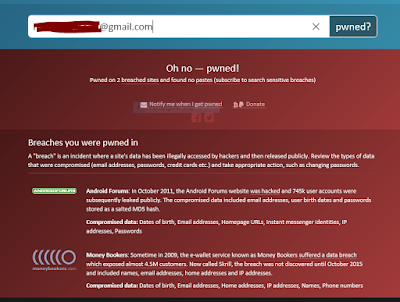

Below is a list of the top sites that has been compromised. See if it's also the time for you to change your password.


Monday, 10 September 2012

How to Recover Hacked Email

One of my friends is having a problem with his email. He can not access it. His password does not work for some reasons. He thinks, it has been hacked and the hacker has changed the data associated to the account and it's recovery. He tried resetting it but he couldn't remember the security pass that was set up.


Whether somebody has changed his password for him or he just simply forgot everything, there is still a way to possibly recover that email.

Alternate email reset

Provided he have set up this when registering the first time then it is easy, and as long as the hacker has not changed this as well. The alternate email should be up and working for this to work perfectly. Here we go.

At the log in interface, he needs to click "I can not access my account", then in the next window, instead of ticking the "I have a problem with my password", tick the "I think my account may have been compromised".


This selection will bypass the "secret questions" which is his other problem. There is also a hint on which email did he nominated as an account recovery. He just need to type one of the emails, just in case that he set up two, like my self.


A confirmation of the recovery will be emailed, then just open that email for recovery instructions.

My thoughts

It is easy to set up emails, but to secure it is easily forgotten until things happen. One of the ways to secure it is to setup a recovery email just in case it will be compromised in the future. Emails that was set up long before may not have this option yet when they were created. 

So if you are one of the early email users, better set it up now, and here is how.

Log in to your email click the drop down menu next to your name. Select "profile" then click "update your contact information".


Type in your choice of email recovery, any email address you own, then press save. You can also add more email recoveries by clicking the "+ add email". This will give you more options when you need to recover in the future.

Do not forget to click verify every email recoveries by clicking "verify now" and going into that account and clicking the verify link.


Sunday, 9 September 2012

Hacked Email


One of the most annoying thing that could happen to an online user is hacked email.

Why is it? Hacked email account is used by hackers to flood the web with scam, phishing, virus riddled  e mails, that are designed to further hack contacts that are connected to the hacked account. It is like a virus that resides in a single cell that infects the other neighboring cells as far and as fast as it could.  This happened to me just yesterday, and I am annoyed.

How did I find out?

This email account is not really my primary email, I use this for general fun. This means I do not regularly access it, maybe twice a month at least. Upon opening the inbox messages, there were about 10 sending message failures (mailer daemon) in it, meaning I have sent something that has not reached the recipients. Knowing that I did not sent anything from this email has made me suspicious of my account being hacked.

The sent letter is coming from my email address going to my brother's address and dozens more, with content of a link URL. I did not bothered opening up the link, because I need to figure out if the hacker managed to log in with my account to send the emails. I need to make sure of this because sometimes hackers can use a spoof email that can mimic your email addres or any address making it look like the  real email from your account.


How to know if the hacker "really" had access to your account  to send the emails?

There is a built in feature of yahoo mail to find out when you have recently  accessed your account and from where. To see this feature, just click  the drop down menu after the hi, "your account name", and click account info. This will make you log in again with your password. Then under sign in security, click "view your recent sign in activity".


The device used, the time and place when  your account is accessed are shown in the list.  You can also toggle between location or  ip number just in case it is accessed in the same location but different ip numbers. Different  ip numbers would be suspicious, unless you are using your networks data tariff.


The above result has confirmed no doubt my account is hacked and been used to send spam messages to my contacts somewhere in Russia.

What to do now?

I am still lucky that I can still access my account and the hacker has not changed the password yet. It is advisable to change the password straight away when you find out somebody has access to your email. The longer and more random the password, the harder for a hacker to crack it. And that's what I did.

My thoughts

I really do not know how the hacker managed to log into my account. I have been very careful in my online activities. I suspect that this account has been hacked longtime before and it is just now that the hacker decided to use it. My password has been my password for years, and that was my mistake.

With this happened , I realised how important it is to change our passwords regularly. Another important thing is not to save sensitive informations, like passwords or any log in details, bank accounts and etc., in your email. Because when you do this and somebody managed to look into your folders, the worst happens.

Be sensible on what you click, specially those links and messages that you think that does not make sense. It maybe just be your gut feelings but if you are in doubt, DO NOT click it.


google.com, pub-9356159227116695, DIRECT, f08c47fec0942fa0

ShareThis

Popular Posts