UK movie goers could save up to 50% on cinema tickets using a comparison website. In a nutshell, this is a buy one take one promo from "compare the market" when you buy any qualifying products like insurance and even switching service providers. For the full list of products, see
You need to set up an account with compare the market, and purchase a qualifying product. The lowest price I found is a two day travel insurance to be used within the UK which costs £2.05. The £2.05 is worth far more than it's purpose when compared to the offered buy one take one movie ticket.
Once the purchase is verified which could take up to 2 days, you will receive your free voucher the next time you log in to your compare the market account. You can also download the meerkat movie application to your mobile phone for easier access to your code.
Remember that you are only allowed to have one account at a time, so if you are family of four, you need to set up a different account and purchase another qualifying product for your partner. So if you plan to use travel insurance for this purpose, buy a separate one for you and your partner and not for the whole family. This would allow both of you to buy one ticket and the second ticket free which would cover the rest of the family, giving you a substantial savings of 50%.
How to claim?
Once you have your voucher code which is only valid for 2 specific days, Tuesdays and Wednesdays, the next thing to do is to find participating cinemas near you. Just enter your post code at
After deciding which cinema to go, bring your code to the cinema by printing it or by logging to your account on your mobile and show it to the foyer. Or you can book online and just collect your tickets with the credit card you use at any of their ATM movie ticket machines. Although purchasing online has a booking fee of 75 pence each ticket, this is still my preferred method as I do not need to queue up at the foyer.
Last Words.
This promo is still going at the time of this post. One unique account is needed for every voucher, and vouchers can be redeemed once only. This means you can only avail of the promo once every week for every account. This promo provides great savings for movie goers and it is to good to be missed. Avail now whilst it is still ongoing!
Smartphones are worth a fortune. Not only because they are expensive but also because they contain invaluable information about the owner. Therefore, care and attention is needed for every owner not to lose it.
There is nothing we can do when they get stolen, but when we misplace it, there is still a hope that the phone can "find" it's way to you. Just cross your fingers that the finder is honest when you ring the phone's number, so that when you happen to find a smartphone, you have the motivation to return the favor by also calling the owner.
But what if the phone is locked, never rings, and there's no way you can get hold of the owner's contacts and alternate number? This will make things a little harder. So before this will happen to anyone, we can set up our android phones to help the finder contact us.
Make use of Android's owner information.
The owner information can be edited to show a message or anything when the phone is locked. It is not activated by default.It can be accessed by pressing Settings>Device>LockScreen>OwnerInformation(1). Tapping it will prompt you to edit text window. Typing a greeting is cool but it is more useful to just type the alternative number to call when you misplace your phone, plus a polite message(2). The text is now available to view in the lock screen(3).
What's the point of a stylus with a touch screen smartphone? It seems like it doesn't make sense when you can use your fingers instead. It sounds redundant. But the S-Pen of the Note 3 makes sense. It solves some of the problems I encountered whilst using a standard smartphones. In my opinion it is useful in many ways.
The Action Memo
Have you ever been in a hurry taking down a phone number that the host of a TV show or radio says on air? Chances are it will be too late before you can even get your phone ready to type in a number. With the note, just take the stylus out and tap the action memo mode(1). You can start jotting down the number(2). Make sure to write down phone numbers in straight and one line for easier recognition. Then tap the third icon(6) from the top to choose on a task. Tap the telephone icon(7) to dial it or save(8) it as a contact.
This is not limited to numbers, you can write down anything and have the option to send it as a text(9), search on the internet(10) or save in as a memo(11) in your calendar.
The Scrap Booker
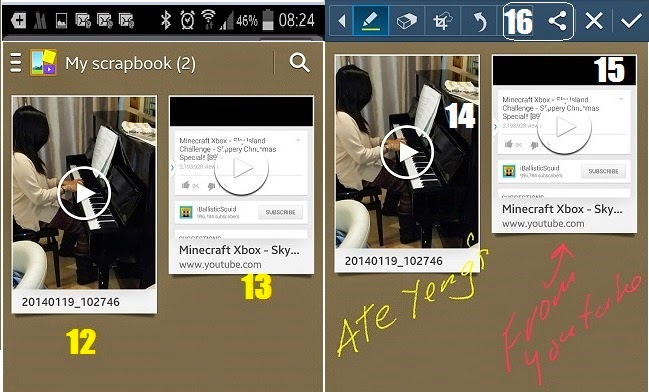
If you have many videos recorded in your device, sometimes it is hard to find a specific clip to play straight away. It takes sometime to find what you are looking for depending on the number of contents. One way of keeping your favourite videos separate from the rest is to use the Scrap Booker(2) function of the S-pen.
What it does is to save your favourite videos(12) in the Scrap Book application for easier retrieval. It can also grab a video from the internet like youtube. It saves a screenshot and a link to tap(13) whenever you want to play it.
To save a favourite video or a video from the internet, just draw around anything on the screen whilst the video is playing.
The Screen Write
Sometimes it is hard to do a screenshot using the palm gesture or the key combination. The Screen Write (3)does this with ease. The big difference is, it does a bit more not just taking a screenshot. The screengrab can be annotated (14,15) or drawn over after the capture. The screen shot is not automatically saved, so you have the option to save or discard , share(16) via bluetooth, email or social network, to store in the cloud (drop box) or print.
The S Finder
This is the powerful search function(4) of the phone. It has a copy of everything that is happening(17) in chronological order. From emails received(18), activities you've done, calls made to text sent or received and many more. Enter a word in the search area(19) and it shows where the similar word is stored in your phone or from web(20) activity.
The Pen Window
This lets you have a continuity of whatever you are doing. For example when you are in a website and have find something you want to share through the telephone with your friend, you can easily do this without moving away from the website or source of information. Just take out the stylus and tap the Pen Window icon(5), draw a rectangular shape and a small window(21) with compatible applications that can be launched will appear. Now sharing the info with your friend(22) is just a tap away.
My friends run into different problems with their smartphones this month. And as usual and being curious, I took a closer look on what's causing the problem. Though I am not really a techie person, I had some suspects on why their phones are behaving that way, and simple solutions that remedied the situations.
1. iPhone 5 on O2 network can not go online using mobile data
My friend told me that it was working fine but can no longer connect to the internet while on the move using mobile data. But it can go online using wi-fi connection.
Her iPhone is showing 3G connection, and she told me that she has a data plan. In my opinion it should be able to go online, as her tariff has an internet allowance. Going into the iPhones APN settings (tap Settings, General, Cellular or Mobile Data, Cellular Data Network or Mobile Data Network) showed the correct APN for iPhone mobiles which is idata.o2.co.uk . Investigating further, she told me that the original tariff is for an android mobile phone that she just ordered a nano sim and ported the number of her original tariff to it. This made me suspicious that the problem might be the APN setting. We've changed the iPhone setting(idata.o2.co.uk) with the original android phone's apn setting (mobile.o2.co.uk)and it worked!
2. Samsung S3's SMS Problem
2.1. Can't send a text message
Another friend is annoyed one afternoon when she cannot send a sms message to her son telling to get the house key from me because she will be out. A call might be a better idea but she is concerned that the mobile ring will make a disturbance inside her son's class.
Every time she sends a message from her android phone, the phone says, "failed". It can receive a test message though. And she told me that she the problem just started a few days after one of her children played with the mobile.
What could be the problem?
I went into the message settings of her android phone and found out that the message center number is not properly set. It is only showing +44 and it should be at least 12 numbers. She doesn't know what happened but I suspected that somebody has accidentally deleted some of the numbers.
Going to the O2 website, we've updated the message center to +447802000332 and she was able to send messages again without running into failed message alert.
(go to message center by opening Messages, then touch the bottom left soft key and touch Settings, scroll to Text message settings, then tap Message Centre)
The message centre for sms should automatically be set but if you run into problems with sending a text then it is best to check if it is set correctly. Below are the sms numbers from popular networks.
3 (three) +447782000800
ASDA +447785014315
O2 Pay As You Go +44 7802 092 035
O2 Pay Monthly +44 7802 000 332
Orange +44 7973 100 973
Talk Mobile +44 7785 014 318
Tesco +447802092035
T-Mobile +44 7958 879 879
Virgin +44 7958 879 890
Vodafone +447785016005
2.2 Long text message is converted into MMS
The fact that the Samsung S3 can only handle 160- character SMS at a time is annoying. If you exceed this, it will be converted into MMS(yellow boxed) and sent through the mobile phone network's internet service. The recipient should also have a smartphone with MMS enabled to read it. Or if you do not want to use MMS or your recipient do not have a smartphone, you need to stop and send your message after the 160th character and compose another with the rest of the message after sending the first one.
To solve this problem, you can download a messaging service app from the play store to get round this. One particular application is Go SMS Pro. This app has additional enhancements that can spice up the rather boring native sms application.
3. Battery is draining fast
Here's a classic smartphone problem, that I admit to continue have experience it from time to time with my S3 phone. With the built in settings to save the battery and other free apps that promise to extend battery life, why the smart phone is not smart enough to manage it's energy supply?
Here's what I have found out. You might be thinking of turned on wi-fi, bluetooth etc, although these contribute to the battery drain, but the real culprit is the handset is kept AWAKE at all time! Symptom for this is it loses it's battery power very fast, that you might need to charge it at least 2 to 3 times a day or more. See if you have an insomniac phone by going to settings then tapping the battery (1) then the battery level(3). You can see that the "awake"(4) entry is continuous. I also suspect that the AVG(2) is stalled or taking time to do what it's doing. You can also see a very fast discharge of more than half it's power in 4 hours.
What I did here was to force quit the application in question by going to Settings, Applications, then to the program in question then force quit(5), and restarted the phone at the end. See the difference of the second batch of screen shots taken the day after. It's been on for 15 hours. The awake button is intermittently turning on and off. You can see that when it is not awake(7), the battery level(6) is flat and when it is continuously awake (9) the battery has a very steep plunge(8).
Latest models of TV's has a built in USB port usually positioned alongside other input ports at the end or at the back of a telly. This port is a built-in multi media player that is capable of playing digital contents like photos, music and videos.
How can I use it?
The operation is simple. Plug in a USB device, turn on your TV and flick the input source on your remote to USB, then media interface categories the supported files into Videos, Music and Photos. Then like when using a computer, you can open the files that are shown and play it. Files with in a folder can be browsed and played as well.
Why is it that videos and music inside the USB are not showing.
This is because of file compatibility. The usual supported media formats for music includes Dolby Digital, AAC, RA, OGG, MKA, MP3, WAV, APE, FLAC, DTS, LPCM, PCM, WMA (V9), IMP/MS ADPCM and WMA Pro. For photos, it can output images of these formats JPEG, JPG, M-JPEG, PNG, TIF, TIFF, GIF, BMP and HD JPEG, and videos can be played using MPEG 1/2/4 (MPEG 4 Part 2), H.264, VC-1, H.263, VP6 (640 x 480), DivX Plus HD, DivX 3/4/5/6, Xvid, RMVB 8/9/10, RM, WMV (V9), AVI, TS, M2TS, TP, TRP, ISO, VOB, DAT, MP4, MPEG, MPG, MOV(MPEG 4, H.264), ASF, FLV (640 x 480), MKV, M4V files.
The bad news is, depending on the make of your TV, it can only play a specific file for a specific media. The good news is, there is a common denominator on all models that they can all play. For photos for example, the file jpg, jpeg or png, MP4 for video and MP3 for music. So if you happen to have downloaded a movie or music that can not be played on your TV USB port, make sure that it is in the right universal format. For example if you have downloaded a movie from you tube, make sure it is converted into MP4 as it is most probably in the FLV format.
You can change this into MP4 by using a video converter. In my experience, I usually make use of Freemake Video Converter. See previous post on where to get it and how to use it.
If you want to convert your existing music, especially from apple devices, to mp3 so that the built in media player of your telly can play it, then refer on how to transform them into mp3 with this post using iTunes.
The freezing temperature in spring time is very odd. Is it the effect of global warming that makes the ice caps melting and with the aid of the blustery wind, it sends down the temperature readings to below zero degrees celsius? Whatever the reason, it is disturbing the nation or the world by halting transportation, necessities like heating and power, and creating chaos not just like here but all over the world.
Emergency equipment is so essential specially at times like this, as in case of being isolated due to bad weather or lost somewhere else, it is comforting to have battery juice on our radio and cellular phones to hear from the "outside world" what's going on or to tell relatives not to worry we're doing fine. Or battery powered light could be the last thread between life and death in an emergency. But like any powered equipment that rely on battery, the power source could run dry that renders the best smartphone and radio useless. It is therefore worth thinking about the worst case scenario, where mains power is out for a week or more, and invest in something that could be a life saver, a self powered generating station.
Dynamo wind up power light
As the name says, it is powered by a dynamo. The device still have batteries inside, but not like the disposable ones, they can be recharged by cranking a built in dynamo by hand. A two minutes of continuous cranks can provide 30 mins of power. The bulbs are made up of LED, known for being a power efficient and last many years.
There are also models that can be recharged by mains or by car battery aside from dynamo.
Dual powered radio
And to hear from the outside world, a portable radio is essential. Even more essential is a radio that lasts without the need of additional batteries. Dual power model like the dynamo and solar powered device can give you news at anytime, rain or shine. No worries even the mains doesn't come back for a month, as this device doesn't need it. Other models also have the capability to recharge a compatible cellphone with charger cables that come with it.
Self powered chargers
Communication can be the last bridge between life and death in an emergency, so it is essential to keep the lines open and the equipment up and running. Harnessing the power of the sun to use it on batteries or by the use of the power of magnets can give you an endless source of power as long as you have the gadget to do this. They may not be available to your normal electrical store or if they are, they can cost arm and leg. But getting this at the worlds marketplace is a bargain.
The reality of man's great contribution to global warming is alarming. Though we can not stop in one push of a button, perhaps we can help in retarding it's effect by simply relying to natural forces in powering up the gadgets we use everyday. This can also make us fit in the process.
There is a simple way to diagnose a samsung smartphone without the aid of any tool or professional help. Although the functions that can be tested with this built in tool is just limited, the said functions are essential in the usage of the phone, like the phone's speaker, proximity sensor, light sensor, the RGB pixels of your phone, accelerometer and so on.
Why would you do that? Sometimes the speaker seems dead. Your phone does not ring, does not play a sound, does not play music and you do not know what happened. Testing the speaker if it is functioning would save you a lot of time in determining if you have just turned the volume at it's lowest or you've put your phone into mute.
To get the phone into test mode, dial * # 0 * # on your phone. After pressing the last character which is the # symbol, your screen would give you a screen like this.
Fig. 1
Pressing the SPEAKER will make your phone ring even when you turn the volume down or your phone is on silent mode.
If you hear the ringing sound, you are assured that you might have just muted the phone, accidentally turned it off or put the volume at its lowest.
If you do not hear anything, then you are sure your speaker is the problem.
Wrong Picture Colours
If the colour of any picture shown at your screen seems not right, there might be dead pixels or dead colour pixels in your phone. Press RED, GREEN and BLUE(see fig. 1) to see if your screen gives a solid red, green, or blue depending on what you press. There might be dead pixels when you can see a dot or gap on the screen, And you will know which colour has the problem when you see dead pixels depending on which colour you have pressed.
Camera Functions
Mega cam and front cam will let you test whether your camera is functioning well without opening up the camera application. Why do you want to do this?
On this mode the camera is tested if it can capture still image but the image is NOT normally saved into your phone or memory card thus saving you space on the phone's memory and finger taps to delete the test shots!
Test Vibration
This will test the phone's vibrate function, specially when in silent mode.
Touch Accuracy
Do you make a lot of error when you type? Or do you suspect that your keyboard is too small to make a precise tap on your phone's virtual keyboard? Try this one and this will help you decide if you need to put the phone into landscape mode or you need a stylus pen or recalibrate your device.
The aim is to touch the middle of the small squares and after you have touched all the small squares, depending on the accuracy of your touch, it will flash a PASS or FAIL message.
Sub key
This is a test for the two light sensing button at the right and left of the home button. Pressing this buttons will change the colour of your screen. This means, both buttons are working.
Gyroscope and Accelerometer functions
Why you need to test this?
This is helpful for the gaming generation, you can be sure that your gyroscope and accelerometers are calibrated and functioning properly. Imagine if these do not function correctly, this will result in error and playing faults, especially on games that requires tilting and moving your device. It can also affects other applications like measuring gauge, level gauge, I use this to correct straight angles when helping with kid's assignments but too lazy to look for a protractor or triangles, and those applications that needs precise 90 degrees angle to work.
Just tap the SENSOR button and it will give you an interface like this.
Pressing the graph under gyroscope function will give you a graphical representation of your movement.
The self test will assure you that you have a fully functioning movement sensor on your phone when it says PASS
Discussed at a party, some of my friends are having problem watching streaming movies using Windows Media Player. Particularly videos from ABS-CBN, a subscription video services showing TV programs from the Philippines ABS-CBN channel 2 network.
The symptom of their problem is the movie being streamed stops and the player says buffering, then starts again after buffering, or the player completely stops and freezes while buffering.
.
There are many possible causes and the most obvious is internet connectivity causing a slowdown of data exchange from the website server into their internet provider and finally unto their computer. Slowdown can be caused by heavy traffic, or too many users online within the internet providers, or too many users accessing ABS-CBN's server. Anything excessive from the two can make a slowdown. And here are simple remedies that can help.
Low Bandwidth and busy server
There's not much you can do with this but to adjust the way you access the video. Luckily for ABS-CBN users, there's an option for low bandwidth for smaller file size. This makes a significant improvement with lower bandwidth internet users. If this does not work, you can choose to click download. Once the file has been downloaded, the windows media player will play the file continuously. The file is usually found at the download folder, if you want to delete it later.
Sometimes internet providers "trottles" the internet connection. This means they deliberately give lower bandwidth, thus slowdown of connection. You can check the speed of your internet connection at the link below, and if it is lower than what you should have been getting then you can make a screen shot and forward it to your internet provider. To watch a streaming video, like the abs-cbn, at least 2mbps or more is needed to enjoy it.
Sometimes, your computer, slows down because of a lot of things. In this "buffering" problem, I suspect that it is time to clear the internet cache. Internet cache are stored bits and pieces of data from the websites you have visited. Your computer fetch these cached data for the websites to flash on the screen faster. But sometimes the cache gets confused especially when a website has just updated it's contents. What you will see when this happens are partially loaded web pages, badly formatted web pages, incomplete pictures, or in some cases, the wrong picture in the wrong place.
How to clear internet explorer by browser
Internet Explorer
Go to Tools from the Internet Explorer menu bar
Then click Internet Options
Then General Tab
Delete Files button in the Temporary Internet files section
Firefox
Goto Edit from the Firefox menu bar
Then click Preferences
Expand the Advanced menu by clicking the plus sign
Click Cache
Then Clear Cache button
Chrome
Click the Wrench Icon at the far right found on top of the browser
Select Tools
Click Clear Browsing Data
Then check tick clear browsing history, clear download history, empty cache
Then Clear browsing data
Opera
Click Opera Logo at the top left hand
Then Settings
Click Delete Private Data *Optional You can choose to click the dropdown(detailed options) menu to see what data are to be deleted
Then click Delete.
Modem
I've read an article about some modems that use Network Address Translation to forward UDP pockets. Whatever that means, it is one of the reasons why windows media player buffers! So we need to disable this kind of handling of data from the windows media player.
Open up windows media player
Click Tools
Then Options
Then click Network
Untick RTSP/UDP Apply then OK
It's handy to have a smartphone. You can do almost anything. And there's no need to bring along a load full of gadgets. Just one device will do, the mobile phone. But sometimes there is an unpleasant news that can happen to anyone with a smartphone. And that's the shocking unexpected monthly bill. This happened to a friend's friend I met on a party. And complained about charges that her provider sent her. It was not really clear when she told about her additional charges but I am already suspecting data excess.
I've inspected her phone, an iPhone4S and here are the things I found out that suspected to contribute to the shocking bill.
1. Email was on "push" mode
I did not checked how many email accounts were receiving push notifications, but this is clearly one of the contributors to data wastage. When in the "push" mode, your phone notifies you the moment an email reached your email server, thus your email data allowance starts to tick. I've told her to put it into manual mode bypassing the push and the fetch method (where you can set an interval for email notification) to conserve network data charges.
You can set your email push notification to manual by tapping the home screen, settings, mail contacts calen.., Fetch New Data, and choosing manually.
2. Facebook push notification is also on
This is worst than email, specially when you have many friends in your network that update their status everytime. You can turn this into manual mode by going to settings, scroll down to facebook, tap push notifications, and turn off all push notifications.
3. She watches videos and browses pictures on social networking sites
It's so tempting to watch videos sent by friends, especially from social networking sites. As you just need to tap the screen. But remember that videos contain a lot of data and depending on your bandwidth, especially when you're on 3G or HSPDA, you may have been viewing the video version on higher resolution. This means more data bite on your allowance. The same with viewing on photos that are on social networks. Your phone needs to download it first before you can see the image and in the process uses your data allowance.
If you can't help watching a clip or looking at pictures, you can turn off 3G and automatically your phone will use EDGE or GPRS connection. This will be automatically detected by the audio and video servers and will realise that you have a lower bandwidth available and stream you a lower quality and smaller data media files, therefore saving you on your data bundle.
Or better, just watch movies when you are within wifi range.
.
4. Location services is on
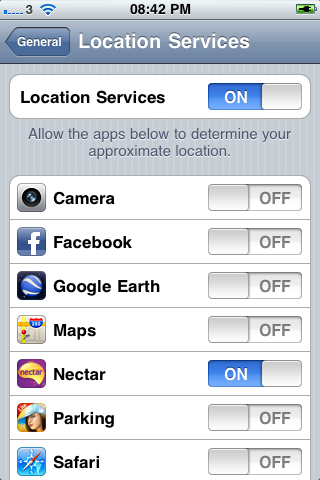
There are native applications and downloadable apps that always tracking the location where your device is. To do this, the apps either use GPS or mobile network to get and send data according to your location. To check which applications are using your location services, tap settings, general, location services. You can tell the application that has requested your location within th last 24 hours by the location icon next to it's name. The native application Maps require constant internet access, this can be downloading data all the time while updating it's location. Applications like the ones to guide you to where you park your car behave this way as well. If you can't help to use it, turn it off when you have marked your location and turn it on when you're going to where you have parked your car specially when you plan to leave your car for sometime.
There are also unnecessary Data waster ay iPhone4S systems location services like diagnostics and usage. This application send to apple automatically,how and where you use your iphone. Other data wasters are location based i-Ads, Setting Time Zone, and Traffic. To save on data, turn these off.
And remember next time you install an application, take a note at the end of the installation as some apps will ask your permission to enable push notification. You need to choose NO.
The surest way to avoid unnecessary data use is to turn off the cellular data button, if you do not like this idea then the surest way not to spend beyond your data limit is to upgrade your data tariff into unlimited internet!
But if upgrading your tariff is not possible then using wifi is the best option when using skype and other type of voip communication, watching movies and clips, listening to streaming music and any other bandwidth hungry online activities.
Is anyone familiar with Craigslist? This is a classified site that caters to community activity listings, personal listings, discussions, house renting and buying, buy and sale of any items, offered services, job sites, and gigs. The big difference from other buy and sell and job listing sites is it's free.
The Interface
The looks and feel is not that classy, but to the job hunter and bargain seeker, this is not important. It is more like a simple menu from a restaurant with a general description initially. Then as you click on from the general descriptions into more specific listings, it will become interesting. What I like with this format is it is neat to look at and what I do not like is you need to spend at least 3 clicks to see the whole of the post. This might be a turn off to those who are in a hurry.
The Listings
When you vgoogle the page, you will be redirected to the nearest Craigslist listing according to your location. You do not need to register for you to browse unless you will be posting an ad. There are listings that are mismatched to the categories they are in. The photos in the listings are only accessible when the link is clicked, and they do not necessarily represent the description of the ad.
Ezeelooker
To help save time, and browse Craigslist with ease is to use Ezeeloker. What it does, is it gives the user more control on what he wants to see at the website, particularly in showing photos of the post or side by side with the listing. This is very helpful and saves time for those looking for a certain item. This is a great tool especially when the user wants a straight decision to see the advert.. A picture, indeed, worths more than a thousand words and a time saver as well..
Ezeelooker is a good and useful add on to buyers and sellers, but it does not seem to work on other categories like Community, Personals, Housing Ads and the rest. It would be very helpful when a prospective buyer has a glimpse of the house before deciding to see it more intimate. A nice preview of an apartment is also very helpful and the decision is much quicker for those who are looking for a place to rent.
There is a feature where you can twit it or can show to your facebook friends what you have seen at the site but I think it is not really relevant to regular users unless you own the post and want to advertise it to facebook and twitter. The favourite tag is I think, clever!
This ad on maybe incomplete but still useful. It is better to have it rather than not. I just hope in the future, that it will work on all categories.
You can download this add on at the link below, compatible with Mac and Windows operating systems, and on Chrome, Firefox, Internet Explorer and Safari browsers.
This guide is specially published for my fellow MMSU CN alumni who will be coming in the UK for a reunion and see parts of the country as an additional agenda next year. Most of the overseas visitors will be coming from the US so most of the things discussed here will be applicable to the US delegation, but still relevant to those coming from other places.
Is Visa Needed?
This is the first question even before thinking of booking a flight. We need to be sure we will not be short on paper works to avoid inconveniences. US passport holder tourists can enter the UK without a visa., as long as they do not plan to stay more than 6 months. If you are staying in the US but a holder of different passport, then you need to check it from the link below. You just need to answer 3 questions and it will tell you straight away if you need it or not.
If you are tight on budget, going into flight comparison sites will be the best option. Going straight into the company's website may not give you a lower rate. That is because these aviation companies also allow booking agencies to advertise for them for at least lower price than the company offers for the same itinerary so that the booking company can also survive the competition.
The flight comparison below is a good start in finding out roughly how much you will be paying for the flight. Sometimes if the flight is bundled with hotel or car rental or both, the whole package becomes cheaper compared to separately shopping from different companies. Although these may not apply every time.
Preparing For the Trip
This is the most stressful part once booking is done, to figure out things to bring along your trip. Deciding which outfit to bring for the kind of weather is very important. It is not practical to guess what's the season at the intended destination. Looking at the weather forecast is a real essential. Ten day weather forecast for London and other parts of the UK is available at
Using a dedicated electronic travel organizer that can be downloaded in your PC or smartphone can help you ease the stress of preparing your travel by creating a list specifically for that particular travel. You can do this with the application by simply ticking the parameters of your travel. The software has a predefined checklist of what to do before your travel and the things that you might need according to what you specify at the start, you can print this out as a guide once you've finished. You can check this great tool at
You also need to be careful in bringing along electrical items taking into closer look at the input voltage. USA mains have 110 volts and the UK 220 volts. Please make sure your gadgets, especially the chargers or adaptors that come with it are auto volts. To know that it is an auto volt, the voltage stamp showing the input of the device should read 100-240 volts. If it just reads 110 volts, then the device can explode when plugged in. So you need to take only auto volts electrical items or devices that can be set into 220 volts.
The type of plug or socket of the US electrical cord needs a little makeover as well. You will need a plug adaptor or converter to use your US plug in the UK. Please do not think this device will effect and change the originL voltage setting of your device. It won't. If your device is not auto volt and at 110 voltage then it will still explode when plugged into 220 volts mains socket. You can buy this from any hardware or electrical store, or online.
If you are planning to bring along food products while in the UK, please see the food items you can not bring along in the UK at
The equivalent of 911 for emergencies is 999. You can dial this number from your mobile free of charge even when you are using your US sim card. Interesting fact is, even when your phone is locked you can still dial it without unlocking it first. If you need police assistance, non emergency number is 101. Call to this number costs 15 pence per call no matter how long your call lasts for. I am not just sure how much it would cost when you are using a roaming phone.
Mobile Communication
Roaming charges for mobile phones may cost you a fortune especially data calls. So be sure to disable your smartphone in using your network's data services when in the UK. Or you can buy a local sim card form O2, Vodafone, 3, or T mobile as long as your mobile phone is unlocked. You can check if your mobile phone is unlocked by replacing your sim card from another network. If the other sim card works, then it must be unlocked. If you are traveling in a group, buying a sim card from one network, like O2 can give every user a free O2 to O2 unlimited voice calls and text for every £15 top up without any deduction from your balance which you could use in calling any network and land line. The free O2 to O2 call and free text lasts for a month the day you top up.
Buckingham Palace at London, Buckingham Palace, SW1A 1AA
The Houses of Parliament, Westminster Abbey, Big Ben, Sea World, and the London Eye are just walking distance to each other. You can also try the river cruise after you've visited these attractions, and again with in walking distance.
Transportation
When touring around London, the cheapest forms of transport is to use the bus services and tubes (underground trains). I would recommend to research the location of the places you want to visit and plan for your travel a day ahead. You can use the link below to plan for your journey, once you've decided where to go, you just need to fill in the post code of your location and the post code of the place you want to visit. The site is also useful in telling you which tube or bus you need to catch. During weekends, some tube stations might have service disruptions because of engineering works.
Black cabs(London taxi cabs) are at least three times more expensive than radio cars(pre-booked cars). If you are planning to drive around central London during 7am and 6pm Monday up to Friday, you need to pay congestion charge of £10 excluding parking charges. For more information on the congestion charges, the areas covered and how to pay it please see
Comfort rooms are called loos, so if you want to spend a penny or wee, ask for the loo.
Elevators are called lifts
At the escalator, you need to stand at the right side as people walk at the left.
When a property is for rental, you can see the sign "to let".
Tea is a popular drink
The term "bloody" is as nasty as F..Y..
Tips are not compulsory
Vehicles are right hand drives
CCTV's everywhere
Roundabouts even at narrow roads
Help I'm Lost!
When you've got lost specially in London, going into the nearest tube station is the best way for your UK friends to find your location. You can also get a tube map from there and I am sure you can figure out how to get from one point to another with the guide map.
Travel Essentials
items discussed in this blog can be purchased from Amazon, this include the plug adaptor, map guides for London, Newcastle and Scotland. Have a look!
I have a new broadband provider and I've decided to use the same wireless setting from the previous one. The SSID is the same (EmpireNetwork) and the pass key is also the same, only this time I have changes the kind of security from WEP into the newer WPA-PSK, but nevertheless the same key value.
I noticed that apple mobile devices IPAD, IPHONE, and other mobile devices has not a problem with the new connection of the same wireless value. Could it be because of the operating system which is not windows? I do not really know.
The windows based computers and laptops has an issue. They can not connect. The computer and laptops can see the broadcast of the SSID name and it's strength but when tried to connect, it says there is an issue with the credentials, and the built in network diagnostic and repair tool can not repair the existing problem.
Click the wireless network icon at the bottom and you can see the available networks within range. The screenshot below shows that my EmpireNetwork wireless connection even though it is within range has a red X on it.
When I hovered the mouse over the EmpireNetwork, the computer can detect it's strength.
When I tried to connect, the problem shows as mismatched credential. I tried diagnostic and repair tool but failed.
How to simply resolve the mismatched credential for a wireless connectivity
1. First step is to delete the existing connectivity, in this case my EmpireNetwork.
Click the "Open Network and Sharing Center" like the one shown at the screenshot above or go to Start, Control Panel, Network and Sharing Center.
Click Manage Wireless Networks
2. Highlight the network name
3. Then click Remove
4. Go back to the network icon at the bottom right of the screen, and you can see that the router's SSID in the list without the red X
5. Click on it and choose connect
6. Type in the passkey
7. You should be then be connected to the network and internet access



.jpg)