Showing posts with label Apple. Show all posts

Friday, 13 January 2017

How to Copy Articles From Flipboard

Flipboard is a useful app for mobile users who love to read. It kills boredom especially during long travels or waiting for transport that is taking forever to arrive. It is even more useful for researchers or copywriters who are looking for interesting story to work on, as the application can be modified to which topic it will show to the reader.

The only problem is, the mobile application does not allow users to highlight the text which makes it impossible to copy a portion or all of the text.

But there's a practical trick to do just that.

This post will show you how to get around this restriction, enable you to highlight the text that makes copying of the article possible,

  • On android device


1. Tap the menu button at he top right of the screen,
2. Select "view on web"
3. Long press on the text and position the slider to the desired position
4. Then press copy.

Now you can paste it to anywhere you want like in a document you are working or note. You can also share the entire article by pressing the share button next to the copy button and you can email the whole article without copying it.


  • On iOS device


5. Long press on the article until the built in menu shows then press "open in Safari". 


6. Long press to select the information you need and press copy!


Friday, 19 August 2016

Why Third Party Cables Let You Down?

Have you bought a third party cable for apple products that does not work? And dismayed to find out that the item did not last very long or is not fit for what it is intended to do?
Lighning Connector
by Apple


 I've been there, and this made me feel cheated and betrayed, not to mention the monetary loss instead of the expected savings I was aiming for. But because I thought all cables were equal, which is true at some point before IOS 7 update and newer apple phones taken over the shelves, I was enticed more to bet on the possible savings, only to find out that third party products are useless in the sense that they do not charge the device properly or could not handle data  or the worst, can damage the device itself.


Why apple makes their accessories a propriety?


Making their own “product only compatible”  is a clever method of maintaining the propriety of the essentials and other add ons and is also a form of protecting the company ‘s liability from the possible damage of other inferior products when used with their brand. Propriety tends to make a brand's prestige intact and unblemished, helping to protect it’s perceptive value among others.


Cheap third party cables show an error message in the screen about reliability or the product could not recognise the product, because it is not apple certified. If you have an apple product before the IOS 7 update, you might be wondering that this problem is not as common as they are now. This is not only about the operating system update but another clever method of apple engineers to incorporate an identifier chip within the cables. How did they do it?


The additional "chip" within.


In an article by gizmodo ,  Peter from Double Helix Cables found a little chip on an official Lighting cables. It is somewhat kind of an authentication chip used by other sophisticated accessories and first time that shown up in a basic accessory. And without this, the updated software in the iPhone or other apple products show the error message on the screen and depending on the conditions they programmed when it is not read or failed authentication, the device may fail to charge, may not transfer data or both. It may cause the device to become very hot and this can damage the device.

Controller Chip Image from Gizmodo


So, if you have these symptoms in using an unbranded cable, the best way to move forward is to invest in an authentic cable that gves you peace of mind that the product works, and guarantees that if something happens with the device whilst using the accessory, you can claim compensation to repair or replace the gadget.


And if you are out of budget or do not have an apple retailer around, there are also brands that has given the right and permission to make their products compatible to apple's. They pay for this so you may find it as the same price as the original.


Here are some pointers to look for.


  • Packaging

Apple encourages companies to join MFi programs to have access to the technology that they use for their accessories. In return they license them to use the MFi logo or Made For i(product) for their products. It could just be compatible for iPhone, iPod, iPad, or it could be compatible for all. You can distinguish the compatibility from the MFi logo in it's box.

MFi Logo

  • Serial Number


The use of serial number in apple products keeps tract of the batch of products for easier recall when things get problematic.This is imprinted in a specific location in an original cable which is according to apple support, has to be 12-digit after the "Designed....Assembled in....." writing thast starts about 7 inches from the USB connector.


  •   Apperance


Apple products are known for their good aesthetic looks, from the device down to the essentials. Judging from the looks alone you can easily distinguish the authentic from the wannabees.  To start with, look at the contacts inside the USB part, authentic product is gold plated, whilst silver plated are dodgy. Below is a collection of photo distinguishing the authentic and imitation product just by looking at the different parts of the cable.


  1.  Single, and smooth and rounded VS more than one piece, rough and squared contacts
  2. size: 7.7 mm X 12 mm VS varying width, length and thickness
  3.  Grey/metallic faceplate insert  VS white or black
  4.  Interlocks are trapezoidal  VS  right angle
  5. Plate is flat, smooth and consistent  VS grainy and rough
  6.  Insulator is uniform and flat VS nothces and indents


MFi Certified Brands.


Apple tend to make their cables boring in design in the sense that there is not much variety offered to different markets like suitablefor the young or old, from the adventurous and the homebodies. The MFi certification enabled accessory companies to address this issue by bringing out products that are as good as the authentic one but with such more flexibility in the sense of broader choice. Anker is one of the companies with a good product, design and variety.


For example you can have the standard length like the one below,

.
3ft Anker MFi Certified
Click for more colours


or if you have an application for a longer cable. You can also choose which color to suite you.
   

http://amzn.to/2b8MyFF
10ft Anker MFi Certified
see more sizes here

Wednesday, 23 March 2016

Why You Will Like the iPhone SE

Life is a collection of changes and turns, going and coming back, and we need to adopt to it in order to survive. After all, these changes shape the world we live in and the things we need to live. After a while, apple turns around and re-shape their flagship phone into the previous version. This is a surprise specially to those who are following the trend of apple phones and expecting an iPhone 6C.

Is it because the sale of the enormous iPhone 6/S is disappointing? Or it's size fills the complaints box of people not used to handle bigger gadgets? Whatever the reason is, this turn around is focused on the users, it's functions and affordability.

Brief Specs and Expectations


The newest apple is the same in size and design as the old iPhone 5 with 4 inch- screen. Yet it behaves more like the iPhone 6S in terms of hardware. It sports the newest A9 processor, the same with the 6S, 2 GB of RAM, but obviously a lower capacity battery that can stay up to 13 hours. The back camera is also an 6S copycat at 12MP and 1.5MP front facing cam as the  6. Though it has a fingerprint sensor, it is not equipped with 3d touch which users say does not make any difference as they do not use this feature much.

With these specs and functionality, the iPhone SE is a price crash version of the 6S. Although it lacks the screen size the iPhone 6 users are enjoying, it balances the equation by better capabilities.

The iPhone SE has not hit the shelves yet but is ready to pre-order now.


Wednesday, 10 September 2014

The Largest iPhone Ever

The world is welcoming iPhone 6, the first leap of the cuppertino guys to brew a larger mobile which is a contrary to apple's single hand design . With a 5.5 inch screen size display, apple is showing it is ready to race head to head for the phablet arena which is at the moment dominated by android. It might have sensed that the trend is going towards a bigger and larger devices. Or have got the clue to  users, being more practical that they choose larger screens as they are more user friendly with a tasks, or simply more entertaining than smaller screens.

The variants


There are two models to choose from, one has a display of 4.7 inches and the other 5.5 inch model. The later is called iPhone 6 plus which the extra size might have contributed to the name. Both models could make the iPhone 5(4 inch screen) looked very small when compared side by side.


What to expect


Aside from the size, the new iPhones have 16GB, 64GB, and 128GB models. Having added the extra storage in terms of internal memory, apple still is not keen of installing slot for external storage. It also sports the new IOS 8 which apple claims as having more exiting features. It also claims  to have a faster dual core processor using the latest A8 64-bit specification with a clock speed of 1.4GHz, and a 1GB of RAM. This specs might look short compared to other mobiles but the real speed is affected by the efficiency of how the device handles its resources.

It might seem too late for apple to introduce NFC feature, but will be more functional than other phone's with the introduction of Apple Pay application.

The 8MP rear camera might sound disappointing to fans, but the incorporation of  the new iSight lense has a faster autofocus and a better noise reduction feature than promises better photos from it's predecessor. The front facing camera has a new sensor that collects more light specially in dim environment to give you a better focused and sharper image.

With it's bigger size, it is surprising that the new iPhone is thinner that the older versions. The 4.7 model is only at 6.9mm thickness, and the 5.5 is thin at 7.1mm compare to the 7.6mm iPhone5 model.

A bigger battery is also matched for longer usage.

Where to order?


Although it is not in the shelves yet you can pre order it from the retailers below:

Carphonewarehouse £43.50/month

Dialaphone (price match promise plus free first month tariff)

Phones4U(with price match promise plus free first moth tariff plus trade in)


Both the iPhone 6 and iPhone 6 Plus comes in 16B, 64GB and 128GB models - See more at: http://hiphopwired.com/2014/09/09/11-new-features-iphone-6-photos/2/#sthash.tUswU08S.dpuf

Tuesday, 9 September 2014

The Unresponsive iPad Mirroring

We watch online content from the Philippines using a third generation iPad(the model we use, but you can use iPad 1 as well) streamed to a big television using apple TV's wireless mirroring.  It is more convenient using this way of connection rather than wired because you can use and control the iPad whilst sitting at the sofa. It serves as both the source of entertainment and remote control.

This morning, we run into a series of iPad problems that include, selective non-responsive screen and mirroring time out!

Selective non-responsive touchscreen.


This problem occurs when my wife is logging into her TFC account.  As she logs in her account across many flatforms, she is automatically logs out and needs to log in again when she switch between devices. Although all links of the website works, and the log in page shows, there seem to be a problem when trying to log in. The problem is the log in box is grayed and it is not rendered active when touched. The on screen keyboard also does not show up.

Is it because the orientation mode is locked? 


I suspected the orientation mode giving the problem because I usually solve this problem on an android phone by rotating the screen from landscape to portrait or vice versa.

But where's the orientation lock?


Swiping the iPad from the base upwards should show the rotation lock, but instead, the mute(1) button is taking it's place. If this happens, it is because the physical lock switch at the right upper side of the iPad is switched to control the orientation lock. So no matter how much you try to change it using the menu under general settings, it will not change the orientation.


So I did slide back the physical lock button at the right upper side of the iPad to change it's orientation from landscape to portrait mode. This seemed correct the problem. Either in the landscape mode, it worked alright after this, and even after we activated the orientation lock button.

Other possible solutions.


If this move have not corrected the problem, either I should have emptied the Safari cache or restarted the device.

Bring back rotation lock!


If you want the control center menu to show the orientation lock instead of the mute button, go to general>use side switch >and choose lock rotation(3).  The change will be immediate and will show the rotation lock(4).


Mirroring Stops


Whilst watching the mirrored show, the connection between the TV and iPad stops. The iPad says that the program is playing at apple TV but the TV doesn't output anything. Restarting the show by refreshing the page starts the mirroring again but stops more or less at the point where it stops the first time. 

There are many causes of this, like failed internet connection, failed Wi-Fi connection, and even failed device. At this occassion I can not fault internet connection as it is OK with the iPad to play contents. I can not blame Wi-Fi as well as the apple TV is connected over Wi-Fi and does not have any problem playing netflix programs. So I am down to a problem with the device.

I remember about a battery saving feature of devices that limits connectivity specially, Wi-Fi, bluetooth and data when they reach a set battery percentage. This means the device throttles the connectivity performance to stretch the battery life. This might be happening with the iPad as it is at 18% life. 

Making it connected to the mains whilst mirroring has corrected the error in this occasion. You can also force the device not to stop mirroring even whilst low in battery by adjusting the sleep button to never, general>Auto-Lock(5)>Never(6).


Tuesday, 17 June 2014

How To Convert Downloaded Movies To Stream Using Apple TV?

Apple TV is very good in streaming movies from apple's iTunes library. In fact any movie that you can  play with iTunes even without adding it in the library can be streamed from any computer that runs iTunes, windows PC's included. However, not every video format is compatible with it. Downloaded videos in FLV, MKV and even AVI formats will not play in iTunes. This means they are just ignored when you want to play them with iTunes. They need to be converted to MP4 first.

I use a free application to convert almost any movie format into MP4. This can be downloaded from


Aside from being free, Freemake Video Converter is very easy to use and fast too. It can convert a video into many popular formats like apple, android, avi, flv, mp4 and many more. See picture below.

How to convert videos compatible to apple TV using FreeMake Converter.

1. Open the application and click video(1)
2. This will open an explorer window and go to where you kept the video you want to convert, in this case, it is under Movies(2). 
3. Choose the one you want to convert(3).
4. Click OK(4).


5. Choose which format you want to convert it. MP4(5) is usually compatible to most media players, iTunes included. This is more flexible than any of the formats available.

6. Next step is to choose the quality(6) of the video. The quality affects the file size, so if you want to transfer your video into a mobile phone, there is a selection for mobile quality. The only downside is, it will not look good when played in a big screen.

7. Choose where(7) you want to save the converted video.

8. Click convert(8)

9. The elapse time during conversion is shown at the popup window. At this point, you can cancel or pause the conversion anytime by pressing the correct button.


How to stream converted video to Apple TV

10. The video is now ready for apple TV streaming. Assuming your apple TV is already connected to the same network as your laptop, right click the converted file(10).

11. Click "open with" and select iTunes(11)


12. Click the airplay button(12) 

13. Then choose appleTV(13).Now you can enjoy the converted movie on a bigger monitor using apple TV!


Monday, 9 June 2014

iPad Quick Fix: Skype Not Working

A friend told me he has a problem with his iPad particularly with Skype. He said he can not use it properly or the application fails at some point. As we are just talking over the phone, I do not know what really is happening.

At lunch time, he brought the iPad for me to take a look. We launched the application on his iPad and on my laptop then try to communicate with each other using Skype. Video is good and can hear me loud and clear but I can not hear him. So this is the problem that he is talking about! His contacts can not hear a word he is saying during their video call conversation.

Things that can cause the problem paraded in front of my mind. It might be the device itself(microphone), the internet bandwidth, the software or the setting!

Problem solving


  • Rule out device(microphone), application and bandwidth

To rule out if his device or the application is the problem, I let him use my laptop to log into his Skype account and I log on to my Skype account to my android device. Our Skype conversation has no problem, we can see and hear each other very well.  I am now suspecting the iPad's microphone causing the problem. To test if it is, I asked him to download other VOIP (oovoo) software on his iPad. After downloading and creating a new account for him, we used oovoo to communicate. The video is superb and the sound is OK as well. This time we know that there is nothing wrong with the iPad's microphone and the bandwidth. So it is down to the Skype application. We might need to re install again or look under the hood and check the settings.

Looking under the iPad's microphone setting, we noticed that the device does not allow Skype(3) to use the iPad's microphone! Tapping the button on did resolved his problem.

To go to the iPad's microphone setting, tap settings> then privacy(1)> microphone(2)>slide and turn the button on(4).


Thursday, 5 June 2014

The Magic of iOS 8

Here's good news to apple fans, the new iOS 8 is coming to your devices. It will be compatible to apple products from iPhone 4s, the iPod 5th generation, and iPad 2, to the newer versions. Improvements and enhancements are surely would enchant apple users because they are new and are just the things they really are missing out from other smartphone users.


More Open


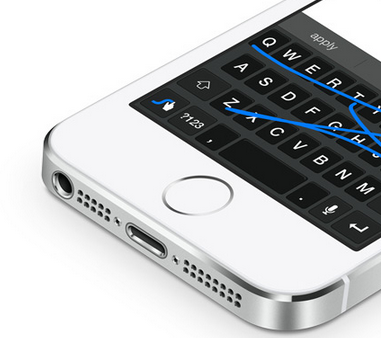
 Apple is mean in terms of keeping away non-apple recognized applications and very reluctant of integrating third party apps as one of its native apps. Users can not really choose but to helplessly use the one provided by the company. This time, iOS 8 gives you the freedom to pick a non apple keyboard input style which has been long enjoyed by the android market. "Swyping" rather than typing is at last in the list of tricks. And as the gate is partly opened, users can anticipate more apps and improvements from the already millions of  existing application catalogue.

Camera Magic


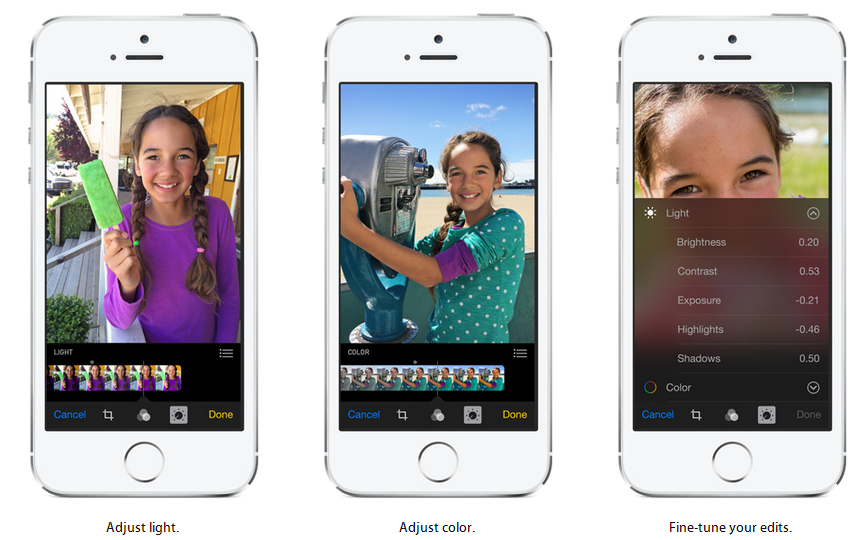
iOS 8 will be a charm to use to take photos with the new features and powerful edit functions away from a desktop computer. This will let the captured moments as perfect as possible even though captured awkwardly. Perfectly cropping and adjusting a loop sided photo will no longer need a full photo software but the native app within the phone's camera. The software also took advantage of the touch interface to easily re orient photos with the aid of a compass like tool. Aligning the horizon this way is more accurate than tapping a button or entering number angles.

Auto settings for photos will make a photo beginner feel like a pro with adjustments at real time. The changes it makes whilst moving the slider help the novice see the difference at every increment and help determine the best result. And with the aid of built in filters, a masterpiece is just waiting to be discovered.

First in the history of mobile phone camera comes the time lapse function which you can only find at a high end professional camera. Users can now experience how to take an accelerated view of the sun from rising from the east and ultimately setting to the west.


 iCloud Magic


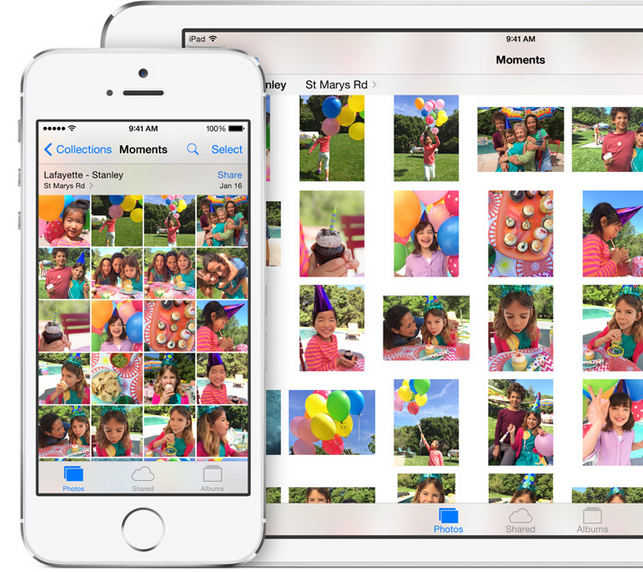
Understanding what users need is one of the ingredients of a successful product. Apple did know, that with the integrated powerful camera will impact the use of the phone's storage. As the iPhone is still not ready to  embrace the use of an external storage, it made a practical move of creating iCloud Photo Library. This do not just remedy the limited internal storage but to integrate more apple products in the same library to access the same file. This means while a user will be taking a photo in his iPhone, he can go home and edit the same photo on his iMac, and view the photo on his iPad while laying lazy on his bed.

Handoff feature does more when connected to iCloud. It picks up user's activity from one device to another. This means a user can start surfing from his iPhone and can continue the same link from his iPad. Other synchorized applications include  Mail, Safari, Pages, Numbers, Keynote, Maps, Messages, Reminders, Calendar, and Contacts.

Connected devices to the same wi-fi network as the user's iPhone now can be used to answer or make a phone call. There is no longer a need to run upstairs where the iPhone is charging as the call can be picked up from iMac, or iPad. Long text messages can be composed easily at an iPad or iMac and can be sent directly to any contact without using the iPhone.

Messaging Magic


First thing that comes to mind in terms of messaging is text messaging, where user type what he sends and the recipient read at the other end. The iOS 8 made messaging exciting by the ability to send voice messages. This is useful when the recipient is behind the wheels or it is imposible to take a glimpse at the screen. Users with disability will also find this useful.

Staying in focus whilst doing something is brought possible by being able to read and reply to messages without leaving the application you are on. This is a form of multi tasking that is practical and productive.


Family Magic


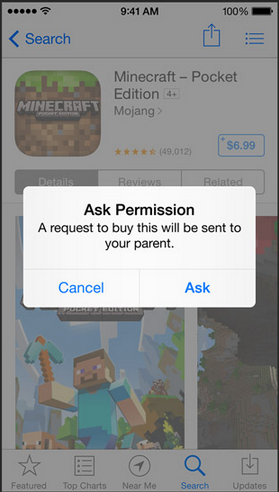
Apple fan family has something to smile about specially the one who did the i-Pay part of the iPad, iPhone, iMac and iPod. After setting a Family Sharing account, everything is shared, from music, videos, and apps  except user names and passwords. So the premium applications of mum and dad can be used by anybody in the family circle. Dad can now forget about shocking bill from a family member tied to his credit card as he can see every invoice directed to his card. \It is just a matter of tapping the necessary button for dad to authorize the purchase.


Saturday, 24 May 2014

How To Stream Multimedia From a Windows Laptop To an Apple TV

Apple TV is great with apple devices. It can output anything you can see on the screen of an iPhone, iPad or iMac in a single tap to a bigger screen. You can see web pages, photos and movies or play games in full view depending on the size of the TV that it is connected to. And it does this wirelessly. Another talent of this little device is not only limited to apple products. It can also stream movies and music from a windows laptop or PC.

Here are the simple steps to do this. Just make sure both the apple TV and windows laptop are connected to the same wifi network.

1. Download iTunes and if you have it already, make sure you have the latest version.

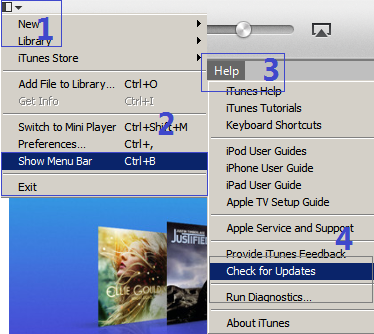
Click the drop down menu(1)>Show Menu Bar(2) to show Help(3)>Check for Updates(4). It will let you know if you have the latest version or needs updating.

2. Add files to iTunes library. You can add a file that you have purchased through iTunes or acquired somewhere else. You can add any multimedia as long as it is inside your computer.

Click the drop down menu(1)>add file to library(5)>locate where you kept your files>choose the file you want to add(6).

3. You can check the files that you have just added by clicking the file category menu(7). Like in the example, the movie file is kept at films category(8). It shows you the number of files and you can distinguish the newly added one by the label added to the thumbnail. Clicking the monitor icon(10) lets you choose if you want to output the movie with the laptop or apple TV(11).


4. To stream the playback to the apple tv, double click the file and the movie will start playing at the TV monitor. Your laptop will show you the progress and the apple tv's connected status(13).


Tuesday, 6 May 2014

Rumours On The iPhone 6

History of the iPhone suggests that a new unit emerges every couple of years, and variants(same model) are enhanced every year. It's been almost two years when the iPhone 5 was first released on September 2012. Many mobile trend analyst are betting the new model will be coming out very soon, and speculations on how the new iPhone will look like intrigues every apple fan. Here is a list of what we might be looking at.

Bigger screen size


The iPhone, despite one of the most successful model, has continued to retain it's one hand operation philosophy. Whilst most manufacturers have already ventured into using phablet size screens to entice customers, the iPhone has no problem of selling it's models with smaller ones.

Analysts are saying it is time for the iPhone to grow in size literally, as users are more likely using their phones to access the internet on the go rather than tablets. Practicality and functionality wise, you can control a bigger screen better than a small one. And with the introduction of 4G connectivity, the amount of activity you can do with the phone whilst on line is only limited to how fast and how accurate you can tap. Obviously, the bigger the target, the more accurate and faster you can tap.


NFC  Enabled


The near field communication  is already a standard feature of most high end smartphone a few years back, but apple decided not to use it on the iPhone 5. Personally, I find no excitement with the NFC on my S3 at first. But as the technology is being used more specially with simple financial transaction, tapping and going with an NFC card is more convenient and fast rather than inserting and entering the card and access number. With further development of the NFC and the support of application developers, there will be a time that all we need is a mobile phone for any  transactions. Apple need to realise that this is coming and need to do something about it. They need to include the NFC chip on their next model.

Wireless Charging


This is another convenience taken into consideration. Though wireless charging is been around for quite sometime, manufacturers are not really serious in putting the whole system into their products. It still needs a dock and an additional sleeve connector to charge wirelessly. If apple wants to have an edge with this popular technology, it is time to embed this on their new product. Imagine a world free of wires.


Removable Battery


One  of the worries of owning an expensive device is when the battery needs replacing. Specially when the battery is embedded inside a unit that you need a special tool, a lion heart, and a hidden extra ordinary talent to disassemble then put back together again. There are videos on how to replace this, and you just need to follow the instructions, and batteries are cheap on bidding sites. But if you do not posses a strong will then the best bet for you is to take the expensive and long way to apple customer service. It would be nice and more practical to make the battery easily replaceable like most manufacturers.

Expandable Memory


Restriction of memory is also one of the negative factors of owning an iPhone. Although cloud storage is available, the miniscule free storage is not enough for todays smartphone usage, and additional storage comes with a price. Though this feature, like the removable battery, is more likely to be not in the menu, this is worth considering. This will show that apple considers the user's need of storage and the flexibility that it can bring.

Who knows what the new iPhone 6 would look like? As they keep us guessing, the more they keep us more curious. We just hope that there will be a major change for the phone and to consider to add those previously restricted  features.


Tuesday, 8 April 2014

Practical Features that iPhone Missed

iPhone 6 Concept Design
Apple's iPhone is a trendsetter in the mobile phone industry but other manufacturers like Samsung and HTC are also setting infront  with their own effects that proved to be attractive to users. I own one iPhone once but disappointed with the shortage of features that rival companies have already added on their products. I couldn't help but feel shortchanged.

No doubt that the make and performance of the unit is superb. But users need not just this. They are also expecting something that can give them an edge in terms of entertainment, practicality, and advanced features. If ever I could customize what's inside an iPhone, I would put these practical features first!

Bigger Screen.


The touch interface is better when you have a larger screen to play with your finger tips. I think the size of the iPhone at the moment needs to grow. The screen is not just enough to give a comfortable view of a webpage. It is a pain to zoom in at small prints and zoom out to see the whole picture. I can not help but to make a mistake in pressing the wrong key when typing at the keyboard, and missing a character to touch when playing a game. You can really feel the difference of using a bigger screen when you start using one.

Beef Up Bluetooth


It is disappointing that the bluetooth capability is limited. It doesn't support data transfer even between two apple devices. Although airdrop feature is available on the latest apple products to share documents, it is limited to certain models and do not support other manufacturers. This is a constraint in the world of data sharing as not all of us are using the same equipment. It is more flexible to be able to send a file from one device to another using the already built in technology. 

Removable Battery


What would you do to an iPhone that can no longer hold a charge? Change the battery by sending the unit to apple or buy a spare battery and an equipment to open it up, watch instructions on how to change it on youtube, and try to change it but unsure if it would be successful? 

I wouldn't be prepared to do any of these. If the phone only has a removable battery cover, then it would be very simple to give the phone another lease of life. 

Removable Memory Storage


Like the battery, an expandable memory bay means a lot in todays mobile generation of users. Equipments are becoming more powerful, cameras have more megapixels, downloadable apps are in millions, and multimedia's can be downloaded anywhere. This means the sources of content is infinite, whilst the device is very limited. And without the option of expanding it's capacity, the user's choice is also limited.


Saturday, 12 October 2013

5 iOS7's Practical Features

There are plenty of enhancements that came with the newest iOS 7 from apple mobile devices. Among these, I have favourites. They become my favourites because they make the user has more control over the devices, and make the device easier to use. My favourites are not the most sophisticated ones but just basic functions that can be very useful.

Automatic Download Update


Gone are the days that you can not use an application because it needs updating or the device grinds into a halt because it is downloading multiple updates. This time with the iOS 7, the update of all apps can be set to automatic and it will automatically updated in the background, without the usual tapping of download and entering passwords. You can also set it to download theupdate only when you are connected to wi-fi by disabling cellular data if network data is an issue.


Siri Got Cleverer


This was just an accidental discovery, but did you know that you can command Siri to tweak simple phone functions like to turn down the screen brightness, toogle wi-fi and bluetooth on or off? Try activating Siri and say " turn bluetooth on", or " turn brighthness down". Below are the screenshots of the tasks done by Siri.


Block Annoying Callers


You can now block annoying callers permanently or temporarily by going to Phone app then tap the Recent activity tab at the bottom of the screen, then the little “i”  next to the number you want to block. The block button is down the bottom of the page. Tap “Block this Caller" and it's done.


Turn It Into a Flashlight


Here's a handy tool that you can use in times of power failure or when you have dropped something under the bed or sofa. You can bring this function on by activating the control center by swiping your hands from the bottom of the phone upwards.


The Reader Button


In Safari, you can eliminate distractions from a website whilst surfing by clicking on the reader button located at the upper right side of the browser. This will strip the page with it's adverts or other items not originally included in the article. This will give the surfer a cleaner interface and turn the page into something like a text document. This is great when you are surfing with network data rather than wi-fi as it will also lessen the bandwidth you use.


Monday, 7 October 2013

The IOS 7 Experience

It was just a rumor mid this year, that IOS 7 will be coming. I was not suspecting a new hardware to be released with the new operating system, but thought of just to liven up the bored familiar and unchanged interface of the apple mobile products since it's beginning. The rumor is realized this month, plus two new hardwares, the iPhone5S and the iPhone5C. And here's the ups and downs I've experienced during the first month of IOS7 experience.

The Update


I experienced no problems downloading the update OTA (over the air), though I've heard friends having to retry many times to complete the update. I did actually pressed the update button during the night and slept over it. The following day, it is ready to install. Installation is a breeze as well, and in one go.


The First Look


The slide to unlock arrow button doesn't look special, in fact it's like drawn by a child, so simple! The passkey's rounded shape and spacing are good and the transparent look makes the numbers look classy and modern. I am not really gone crazy with the changes within the icons. They look simpler than the previous design and have a retro touch, however the name of the applications underneath are not easy to read. If you have a problem like this then using a darker themed wallpaper will help. Or you can make them appear bigger by choosing bold text by going to Settings, General, Accessibility, Bold Text. 


The Control Center


Swiping the screen from the bottom upwards activates the control centre. This is the most used feature of IOS 7 I use. It shows a summary of functions and the ease of activating and deactivating them.


  • Airdrop


Apple is catching up with connectivity. Whilst the competition can transfer any type of files wirelessly long time ago, apple "prohibits" this even to an another apple device. Apple might have realised that this is a let down to advance users so it decided to include airdrop function. This is the direct wi-fi function apple style. The dismal part of this is only the latest apple products is supported like the  iPhone 5, iPhone 5C, iPhone 5S, iPad (4th generation), iPad Mini, iPod Touch (5th generation). This means a let down to earlier devices that upgraded to the IOS7.


  • Airplay


 Pinoys with TFC online subscription who usually stream contents to apple TV will find this very easy and handy to use. It can also mirror what's on the device's screen. This is handy when you want to show off photos and videos or editing easier with bigger screen.


  • Other Shortcuts


Other handy features included in the control center are, flashlight, wi-fi, flight mode, screen brightness, calculator and camera shortcut. But I think apple need to include the mobile data button. As this can save unnecessary internet bill when abroad and it should be easy to access like the other functions in the control center. 

Assistive Touch


This can be turned on by going to Settings, General, Accessibility, Assistive Touch. This feature allows user to turn up or down the volume, mute or unmute the phone without touching the physical button. The feature I use most in this function is the screenshot function. Instead of pressing two buttons, with this function, you just need one to press.

Background App Refresh


This is a new feature that refreshes the contents of an application when internet connection is established using either wifi or cellular connection. This feature can be useful as it can provide up to date information to the user. But if battery and bill is a concern, then it is better to turn this feature off. This can be accessed under Settings, General, Background App Refresh.


Notifications Centre


Swiping the top of the screen downwards brings about the Notifications Center. This is another feature that updates application's content automatically. And just like the Background App Refresh, it uses, wi-fi or cellular data access. It can be helpful or just an annoyance. The good news is you can control which application can get their contents to the notification menu. Just go to Settings, Notification Center, Select an Application from the list and toggle the switch on or off.


The New Safari


The new browser impresses me the most. This now includes easy private(incognito) surfing, easy sharing button and superb visual effect. Though some users say that they feel sea sick with the animation, I see it differently as entertaining. You can tweak it's settings to change the default search engine. You can also save names and passwords as well as credit cards! But if you think this is a rather threat to security, then better not. To increase your privacy, the do not tract button is also handy. These tweaks can be accessed by going to Settings then scroll down to Safari. 


Thursday, 3 January 2013

Why Get an Apple TV


My wife is an apple fan. She expects things to work straight away out from the box without complicated settings. Reliably simple that works every time, that's how she find apple products.

Now that she can view her favourite pinoy tele-dramas on her ipad and iphone, thanks to the site's new interface, I decided to get her something that can mirror these on a big telly. This means being able to use her ipad or iphone to output what's on the screen to a bigger monitor wirelessly. You might be thinking of streaming, but streaming can only output something that is already inside the device, like the itunes contents, and not from an outside source like the internet. To me, mirroring is rather more advanced as it outputs the things you do with the device like surfing internet sites, playing games and using VOIP communications. I also think that it is useful when you are doing a presentation and would like to use your ipad or iphone as a source for files and as a remote control without complicated settings.


What's inside an apple TV box

Like any of the apple product range, the packaging is simple and minimal. Inside the box is the apple TV receiver, the remote control, the mains plug extension and some paper works. It is just a shame the product does not include HDMI connection which is needed to make it work with any TV with HDMI input. You need to purchase one if you do not already have one of this.


Setting up

To set up the apple TV, you need a telly with HDMI input, HDMI cable, wi-fi router, iPAD or iPhone. Connect the other end of HDMI cable to the apple TV and the other end to the telly's HDMI input.Turn on your TV and select the HDMI channel input for the apple device. Then plug the mains socket into the apple TV, and with the remote of the apple TV, press the play button. The device will guide you through to the set up menus. Remember to set up both the apple TV and your apple products ( iphone, ipad, ipod, imac etc.) you intend to output the contents into the same Wi-Fi network as the apple TV.

If you want to use a wired connection to connect the apple TV and wi-fi router, you can use an ethernet connector, RJ45, to do this. I prefer this kind of connection specially that we use the built in internet video provider, Netflix, to watch movies. This kind of connection depends on the proximity of the router, TV and apple TV.


Use Apple TV to mirror internet content

This is the function that I intended for my wife to use, so that she can view her favourite internet programs on her iPad onto a bigger monitor. All she needs to do is to double click the home button and scroll through the apps going to the right and find the airplay button. Tap the airplay button and choose apple TV then turn on mirroring. Follow the same procedure if you want to use iPhone, and if you use iMac or other Mac computers, go to systems preference and under display menu, choose apple TV and turn on mirroring. Now you can output anything you do from your device.


Tips

Before setting up the unit, it is best to download the remote application for the apple TV. This will let you type in your details and settings easier. Direct link of the application is below.


If you have the first generation ipad, you can still stream internet contents and your itunes contents using the device. What it doesn't do is to mirror your activities. There are also built in applications for videos and movies like netflix, vimeo, itunes movies and you tube that you can access without the use of another internet device. 

Which generation of apple device is compatible? As long as you see the airplay button when you double click the home button of your iphone, ipad or ipad, you can play the content on your apple TV.For notebooks and iMacs, if you can see the airplay button at the top of you can detect the apple TV at the display settings, then your device is compatible.


google.com, pub-9356159227116695, DIRECT, f08c47fec0942fa0

ShareThis

Popular Posts