Showing posts with label iPhone. Show all posts

Thursday, 5 June 2014

The Magic of iOS 8

Here's good news to apple fans, the new iOS 8 is coming to your devices. It will be compatible to apple products from iPhone 4s, the iPod 5th generation, and iPad 2, to the newer versions. Improvements and enhancements are surely would enchant apple users because they are new and are just the things they really are missing out from other smartphone users.


More Open


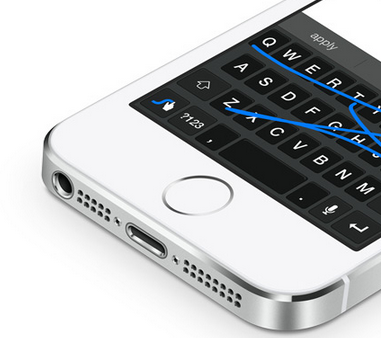
 Apple is mean in terms of keeping away non-apple recognized applications and very reluctant of integrating third party apps as one of its native apps. Users can not really choose but to helplessly use the one provided by the company. This time, iOS 8 gives you the freedom to pick a non apple keyboard input style which has been long enjoyed by the android market. "Swyping" rather than typing is at last in the list of tricks. And as the gate is partly opened, users can anticipate more apps and improvements from the already millions of  existing application catalogue.
Camera Magic


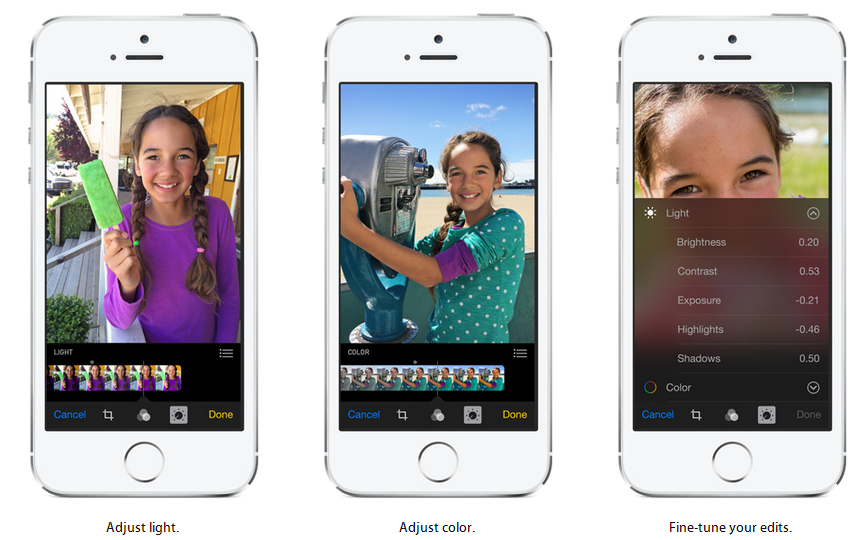
iOS 8 will be a charm to use to take photos with the new features and powerful edit functions away from a desktop computer. This will let the captured moments as perfect as possible even though captured awkwardly. Perfectly cropping and adjusting a loop sided photo will no longer need a full photo software but the native app within the phone's camera. The software also took advantage of the touch interface to easily re orient photos with the aid of a compass like tool. Aligning the horizon this way is more accurate than tapping a button or entering number angles.

Auto settings for photos will make a photo beginner feel like a pro with adjustments at real time. The changes it makes whilst moving the slider help the novice see the difference at every increment and help determine the best result. And with the aid of built in filters, a masterpiece is just waiting to be discovered.

First in the history of mobile phone camera comes the time lapse function which you can only find at a high end professional camera. Users can now experience how to take an accelerated view of the sun from rising from the east and ultimately setting to the west.

 iCloud Magic


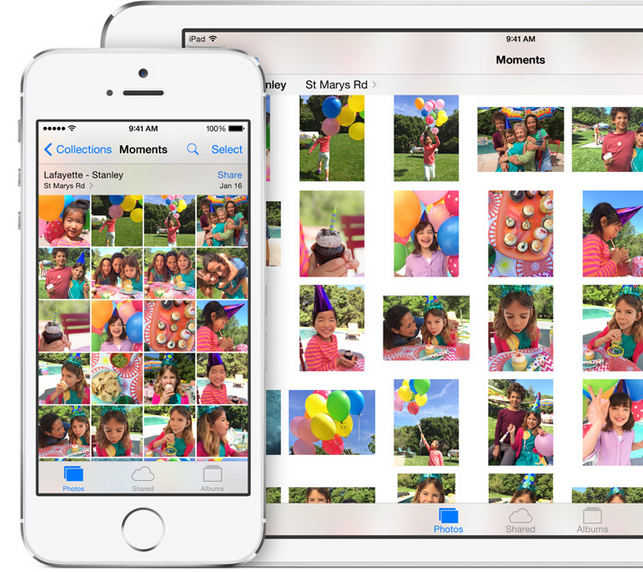
Understanding what users need is one of the ingredients of a successful product. Apple did know, that with the integrated powerful camera will impact the use of the phone's storage. As the iPhone is still not ready to  embrace the use of an external storage, it made a practical move of creating iCloud Photo Library. This do not just remedy the limited internal storage but to integrate more apple products in the same library to access the same file. This means while a user will be taking a photo in his iPhone, he can go home and edit the same photo on his iMac, and view the photo on his iPad while laying lazy on his bed.

Handoff feature does more when connected to iCloud. It picks up user's activity from one device to another. This means a user can start surfing from his iPhone and can continue the same link from his iPad. Other synchorized applications include  Mail, Safari, Pages, Numbers, Keynote, Maps, Messages, Reminders, Calendar, and Contacts.

Connected devices to the same wi-fi network as the user's iPhone now can be used to answer or make a phone call. There is no longer a need to run upstairs where the iPhone is charging as the call can be picked up from iMac, or iPad. Long text messages can be composed easily at an iPad or iMac and can be sent directly to any contact without using the iPhone.

Messaging Magic


First thing that comes to mind in terms of messaging is text messaging, where user type what he sends and the recipient read at the other end. The iOS 8 made messaging exciting by the ability to send voice messages. This is useful when the recipient is behind the wheels or it is imposible to take a glimpse at the screen. Users with disability will also find this useful.
Staying in focus whilst doing something is brought possible by being able to read and reply to messages without leaving the application you are on. This is a form of multi tasking that is practical and productive.


Family Magic


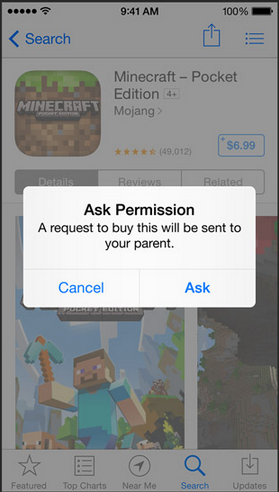
Apple fan family has something to smile about specially the one who did the i-Pay part of the iPad, iPhone, iMac and iPod. After setting a Family Sharing account, everything is shared, from music, videos, and apps  except user names and passwords. So the premium applications of mum and dad can be used by anybody in the family circle. Dad can now forget about shocking bill from a family member tied to his credit card as he can see every invoice directed to his card. \It is just a matter of tapping the necessary button for dad to authorize the purchase.


Tuesday, 6 May 2014

Rumours On The iPhone 6

History of the iPhone suggests that a new unit emerges every couple of years, and variants(same model) are enhanced every year. It's been almost two years when the iPhone 5 was first released on September 2012. Many mobile trend analyst are betting the new model will be coming out very soon, and speculations on how the new iPhone will look like intrigues every apple fan. Here is a list of what we might be looking at.

Bigger screen size


The iPhone, despite one of the most successful model, has continued to retain it's one hand operation philosophy. Whilst most manufacturers have already ventured into using phablet size screens to entice customers, the iPhone has no problem of selling it's models with smaller ones.

Analysts are saying it is time for the iPhone to grow in size literally, as users are more likely using their phones to access the internet on the go rather than tablets. Practicality and functionality wise, you can control a bigger screen better than a small one. And with the introduction of 4G connectivity, the amount of activity you can do with the phone whilst on line is only limited to how fast and how accurate you can tap. Obviously, the bigger the target, the more accurate and faster you can tap.


NFC  Enabled


The near field communication  is already a standard feature of most high end smartphone a few years back, but apple decided not to use it on the iPhone 5. Personally, I find no excitement with the NFC on my S3 at first. But as the technology is being used more specially with simple financial transaction, tapping and going with an NFC card is more convenient and fast rather than inserting and entering the card and access number. With further development of the NFC and the support of application developers, there will be a time that all we need is a mobile phone for any  transactions. Apple need to realise that this is coming and need to do something about it. They need to include the NFC chip on their next model.

Wireless Charging


This is another convenience taken into consideration. Though wireless charging is been around for quite sometime, manufacturers are not really serious in putting the whole system into their products. It still needs a dock and an additional sleeve connector to charge wirelessly. If apple wants to have an edge with this popular technology, it is time to embed this on their new product. Imagine a world free of wires.


Removable Battery


One  of the worries of owning an expensive device is when the battery needs replacing. Specially when the battery is embedded inside a unit that you need a special tool, a lion heart, and a hidden extra ordinary talent to disassemble then put back together again. There are videos on how to replace this, and you just need to follow the instructions, and batteries are cheap on bidding sites. But if you do not posses a strong will then the best bet for you is to take the expensive and long way to apple customer service. It would be nice and more practical to make the battery easily replaceable like most manufacturers.

Expandable Memory


Restriction of memory is also one of the negative factors of owning an iPhone. Although cloud storage is available, the miniscule free storage is not enough for todays smartphone usage, and additional storage comes with a price. Though this feature, like the removable battery, is more likely to be not in the menu, this is worth considering. This will show that apple considers the user's need of storage and the flexibility that it can bring.

Who knows what the new iPhone 6 would look like? As they keep us guessing, the more they keep us more curious. We just hope that there will be a major change for the phone and to consider to add those previously restricted  features.


Tuesday, 8 April 2014

Practical Features that iPhone Missed

iPhone 6 Concept Design
Apple's iPhone is a trendsetter in the mobile phone industry but other manufacturers like Samsung and HTC are also setting infront  with their own effects that proved to be attractive to users. I own one iPhone once but disappointed with the shortage of features that rival companies have already added on their products. I couldn't help but feel shortchanged.

No doubt that the make and performance of the unit is superb. But users need not just this. They are also expecting something that can give them an edge in terms of entertainment, practicality, and advanced features. If ever I could customize what's inside an iPhone, I would put these practical features first!

Bigger Screen.


The touch interface is better when you have a larger screen to play with your finger tips. I think the size of the iPhone at the moment needs to grow. The screen is not just enough to give a comfortable view of a webpage. It is a pain to zoom in at small prints and zoom out to see the whole picture. I can not help but to make a mistake in pressing the wrong key when typing at the keyboard, and missing a character to touch when playing a game. You can really feel the difference of using a bigger screen when you start using one.

Beef Up Bluetooth


It is disappointing that the bluetooth capability is limited. It doesn't support data transfer even between two apple devices. Although airdrop feature is available on the latest apple products to share documents, it is limited to certain models and do not support other manufacturers. This is a constraint in the world of data sharing as not all of us are using the same equipment. It is more flexible to be able to send a file from one device to another using the already built in technology. 

Removable Battery


What would you do to an iPhone that can no longer hold a charge? Change the battery by sending the unit to apple or buy a spare battery and an equipment to open it up, watch instructions on how to change it on youtube, and try to change it but unsure if it would be successful? 

I wouldn't be prepared to do any of these. If the phone only has a removable battery cover, then it would be very simple to give the phone another lease of life. 

Removable Memory Storage


Like the battery, an expandable memory bay means a lot in todays mobile generation of users. Equipments are becoming more powerful, cameras have more megapixels, downloadable apps are in millions, and multimedia's can be downloaded anywhere. This means the sources of content is infinite, whilst the device is very limited. And without the option of expanding it's capacity, the user's choice is also limited.


Saturday, 12 October 2013

5 iOS7's Practical Features

There are plenty of enhancements that came with the newest iOS 7 from apple mobile devices. Among these, I have favourites. They become my favourites because they make the user has more control over the devices, and make the device easier to use. My favourites are not the most sophisticated ones but just basic functions that can be very useful.

Automatic Download Update


Gone are the days that you can not use an application because it needs updating or the device grinds into a halt because it is downloading multiple updates. This time with the iOS 7, the update of all apps can be set to automatic and it will automatically updated in the background, without the usual tapping of download and entering passwords. You can also set it to download theupdate only when you are connected to wi-fi by disabling cellular data if network data is an issue.


Siri Got Cleverer


This was just an accidental discovery, but did you know that you can command Siri to tweak simple phone functions like to turn down the screen brightness, toogle wi-fi and bluetooth on or off? Try activating Siri and say " turn bluetooth on", or " turn brighthness down". Below are the screenshots of the tasks done by Siri.


Block Annoying Callers


You can now block annoying callers permanently or temporarily by going to Phone app then tap the Recent activity tab at the bottom of the screen, then the little “i”  next to the number you want to block. The block button is down the bottom of the page. Tap “Block this Caller" and it's done.


Turn It Into a Flashlight


Here's a handy tool that you can use in times of power failure or when you have dropped something under the bed or sofa. You can bring this function on by activating the control center by swiping your hands from the bottom of the phone upwards.


The Reader Button


In Safari, you can eliminate distractions from a website whilst surfing by clicking on the reader button located at the upper right side of the browser. This will strip the page with it's adverts or other items not originally included in the article. This will give the surfer a cleaner interface and turn the page into something like a text document. This is great when you are surfing with network data rather than wi-fi as it will also lessen the bandwidth you use.


Monday, 7 October 2013

The IOS 7 Experience

It was just a rumor mid this year, that IOS 7 will be coming. I was not suspecting a new hardware to be released with the new operating system, but thought of just to liven up the bored familiar and unchanged interface of the apple mobile products since it's beginning. The rumor is realized this month, plus two new hardwares, the iPhone5S and the iPhone5C. And here's the ups and downs I've experienced during the first month of IOS7 experience.

The Update


I experienced no problems downloading the update OTA (over the air), though I've heard friends having to retry many times to complete the update. I did actually pressed the update button during the night and slept over it. The following day, it is ready to install. Installation is a breeze as well, and in one go.


The First Look


The slide to unlock arrow button doesn't look special, in fact it's like drawn by a child, so simple! The passkey's rounded shape and spacing are good and the transparent look makes the numbers look classy and modern. I am not really gone crazy with the changes within the icons. They look simpler than the previous design and have a retro touch, however the name of the applications underneath are not easy to read. If you have a problem like this then using a darker themed wallpaper will help. Or you can make them appear bigger by choosing bold text by going to Settings, General, Accessibility, Bold Text. 


The Control Center


Swiping the screen from the bottom upwards activates the control centre. This is the most used feature of IOS 7 I use. It shows a summary of functions and the ease of activating and deactivating them.


  • Airdrop


Apple is catching up with connectivity. Whilst the competition can transfer any type of files wirelessly long time ago, apple "prohibits" this even to an another apple device. Apple might have realised that this is a let down to advance users so it decided to include airdrop function. This is the direct wi-fi function apple style. The dismal part of this is only the latest apple products is supported like the  iPhone 5, iPhone 5C, iPhone 5S, iPad (4th generation), iPad Mini, iPod Touch (5th generation). This means a let down to earlier devices that upgraded to the IOS7.


  • Airplay


 Pinoys with TFC online subscription who usually stream contents to apple TV will find this very easy and handy to use. It can also mirror what's on the device's screen. This is handy when you want to show off photos and videos or editing easier with bigger screen.


  • Other Shortcuts


Other handy features included in the control center are, flashlight, wi-fi, flight mode, screen brightness, calculator and camera shortcut. But I think apple need to include the mobile data button. As this can save unnecessary internet bill when abroad and it should be easy to access like the other functions in the control center. 

Assistive Touch


This can be turned on by going to Settings, General, Accessibility, Assistive Touch. This feature allows user to turn up or down the volume, mute or unmute the phone without touching the physical button. The feature I use most in this function is the screenshot function. Instead of pressing two buttons, with this function, you just need one to press.

Background App Refresh


This is a new feature that refreshes the contents of an application when internet connection is established using either wifi or cellular connection. This feature can be useful as it can provide up to date information to the user. But if battery and bill is a concern, then it is better to turn this feature off. This can be accessed under Settings, General, Background App Refresh.


Notifications Centre


Swiping the top of the screen downwards brings about the Notifications Center. This is another feature that updates application's content automatically. And just like the Background App Refresh, it uses, wi-fi or cellular data access. It can be helpful or just an annoyance. The good news is you can control which application can get their contents to the notification menu. Just go to Settings, Notification Center, Select an Application from the list and toggle the switch on or off.


The New Safari


The new browser impresses me the most. This now includes easy private(incognito) surfing, easy sharing button and superb visual effect. Though some users say that they feel sea sick with the animation, I see it differently as entertaining. You can tweak it's settings to change the default search engine. You can also save names and passwords as well as credit cards! But if you think this is a rather threat to security, then better not. To increase your privacy, the do not tract button is also handy. These tweaks can be accessed by going to Settings then scroll down to Safari. 


Saturday, 17 November 2012

The Cheapest iPhone 5 Deal

The most sought  iPhone 5 is now available to most retailers, but sometimes the shelves are dried up empty  and could not cope up with the overwhelming demand, so ordering it is not straight forward. It test your patience and how well you plan for it's delivery. It also test your wallet.The lowest tariff at the moment without paying for the phone is £39 a month for 2 years contract. This translates into £936 for the 16GB model. If you want to pay for a lower tariff, you need to pay a contribution of owning it. The lowest upfront payment is £49 and £37 monthly or a total of £937 for 2 years. The difference in tariff is just a pound, but if you take a look closely, the £1 difference means a lot in terms of what you'll get, the free minutes and data bundle. See the deals here.

 Advantage of Buying Direct From Apple

 If you have the available cash to get this product, no doubt the cheapest way to get the iPhone 5 is through apple store. The lowest spec is priced £529 upfront. This is the 16GB model which you can have it on colours black slate or white silver. The price already includes delivery and packaging. It is almost one half cheaper than getting it with a contract.

The advantage of getting it direct from apple rather than from auction sites is you  are sure the product is authentic. You are sure about the warranty of the product that you can send it back in case there's a problem with it without necessarily shouldering the bill of sending and again, delivery back to you after repair or replacement.

Another advantage is, your iphone 5 is sim free. This means, you can pop in any compatible sim card from any network and from any country.


The only hassle that you will encounter when buying from apple store is the waiting time for the delivery of the product. For those who want the phone straight away, getting it from apple may not be suitable. That is because you need to wait about two to three weeks before your order is delivered. In my case, it took exactly three weeks. My advice is to calculate the day you are home before ordering because you need to sign for it and may need to show any identification card. If you will not be home, make sure to leave an identification card to whoever at home to receive your order. But just in case no one is around and you missed the delivery, you will be given a notice when they'll be coming back or a number to call to arrange a delivery. Buy iPhone 5 from apple.

Using an Existing Contract for the iPhone 5

What if you have an existing older iphone contract and hasn't ended yet? Can you buy a sim free iPhone 5 and put your existing micro sim in it?

The iPhone 5 takes a smaller form,  nano sim, and the existing micro sim won't be compatible to the tray provided. But still you can use your existing contract to use it with the phone. What you need to do is to request a nano sim card from your network. O2 is good at this. When I placed the order from the apple store, I did contacted them through their website, and the nano sim card was delivered two days after. Get your O2 nano sim card here.

Setting up your Sim Free iphone using existing credentials.

On O2, using your existing and current tariff to your iphone 5 is easy. Once you have your phone and nano sim, you just need to contact O2 that you want to transfer your existing credentials into the nano sim for your iPhone 5. You can do this online or through a text in four simple steps. You will need your existing phone number and the number of the nano simcard located at the back of the sim carrier. 

To do it online go to http://swapmysim.o2.co.uk/. Alternatively, send a text swap to 20220 from the existing number you want to use and O2 will send you a code for the sim swap process. The swap will take at least two hours up to 24 hours, but in my experience it was under 2 hours.


Is there any problems using a contract from a non iPhone sim card?

There was no problem making and receiving a call, sending and receiving messages, surfing the net via wi-fi or data bundle during the first two weeks, but I  noticed the other day that there was an error saying "You are not subscribed to data service" when it can not connect to the internet using the data bundle.

There was nothing wrong with the existing APN settings for iPhone when I compared it with the O2 website. Then I realised  that the existing APN is from a non iPhone unit. So I changed it with the credentials, APN and user name, of the original contract, and did not changed the password.

This resolved the problem!


Getting it Sim Free From Resellers

The 32GB, however, is available to their certified resellers at the same apple price of  £699. The advantage of buying your iPhone through them is the readiness of the product. You can get it the next working day after you order or you have the option to pick it up at their store later if you buy online. Another advantage is you can choose which day you want your item delivered. See further details here!

The Round Up

No doubt, like the past models, the price of the iPhone 5 with contract will drop, but I guess not any sooner. When the next model will be out, might be an iPhone5 S or 6, will be the start to get it at a lower price if you have the patience enough to wait for sometime.

If you can not wait that long the cheapest way then to get it is to buy sim free from apple for the lowest spec, or from their re sellers  for the higher specs and want it ASAP.

Friday, 9 November 2012

Easy Sync Mobile Contacts for iPhone5

The painful part of having a new phone is transferring contacts from the previous mobile phone. There are ways to do it using the native hardware and application provided within the phone like bluetooth transfer or just the simple SIM swapping on most phone brands, however in apple products, it is inconvenient, bluetooth doesn't support contact transfer. And again, even if you have managed to save all your contacts into your regular SIM or micro SIM, there is still a problem specially with the iPhone 5 that requires the newest nano SIM form factor, they just do not fit,physically.

iTunes is still the best solution of connecting and transferring of contacts between apple devices, but as it needs computer to connect, it is not convenient. Using iCloud service is also an other alternative and could free you from wires but  is only applicable to apple devices in terms of contacts synchronization. Latest update of the devices is also needed for the service. If you are in a hurry and wants to sync your contacts straight away, you can bypass both iTunes and iCloud with the free PhoneCopy application.

Phone Copy Application


This application lets you syncronise your contacts between your iPhones or other phones without downloading large applications. You do not need iTunes and doesn't need wires either. It is a time saver and no complicated settings. Just register online, download the application on your iPhone, synchronize it, and you are ready to copy your contacts to your new iPhone 5.

Register online. 

On your PC, go to https://www.phonecopy.com or just click the logo above. Choose to register and a confirmation email will be sent. Go to your email and confirm.


Download App

On your source iPhone(where the contacts you want to copy), download the phone copy application using iTunes. Sign in with the credentials you have associated with phone copy and press synchronize. 


During the synchronization, you will be asked to choose which way you want to synchronize, from the device to the server or from the server to the device. Obviously for the first time, you want to copy all your contacts from your device to the server. This would take a minute or two depending on the number of contacts in your phone.


Edit Contacts

Check the synchronized contacts by logging in with your PC ( why PC?  It is easier to edit documents with a laptop or PC), and delete or  edit your contacts as necessary. 


Do not worry if you've deleted a contact accidentally as the deleted contacts will be in a separate folder and can be reverted in just a click.


Synchronize on the New iPhone 5

On your new iPhone 5, download the same application and log in with the same credentials as the old iPhone. Click synchronize, this time from the server to this device,  and you're done!


This application supports Android devices as well.  Just follow the same procedure and you can sync contacts from apple to android or vice versa.

Friday, 14 September 2012

The iPhone5


The most anticipated device is here again, ready to amaze the mobile crazed fans around the world. A certified queue maker and undeniably tech-trend setter. It's unveiled and will soon be available to all mobile phone retail outlets. Pre orders starts today! So what's new?

-->

Form factor

The original iPhone4 and 4S stand at 4.5 inches, have a 2.31 inches width, .37 inch depth and about 140 grams. The new one or the iPhone5 is taller at  4.87 inches, the same width at 2.31 inches, thinner at .30inch and lighter at 112 grams.

Display

The retina display of the new phone is also stretched half inch to 4 inches, which is more suitable in viewing landscape mode or watching movies on a wide screen format. The resolution is also stretched to 1136 x 640. Does this means clearer? The additional pixels is because of the longer screen, what it makes it "clearer" is because apple took off the separate laminated touch screen panel and the screen now has a built-in digitiser, making the new unit slimmer and clearer. The colour saturation is also boosted to 44%, making the images more vibrant.


Processor

The new A6 processor powers the iPhone5. Apple could only mention that the new A6's performance doubles the CPU and GPU speed of that of the A5 from the iPhone4s. This means the apps load faster, browsing will make the pages appear instantly. Faster graphics would make gamers addicted to more fluid rendering of movements and change of scenes. Although Apple has been silent on the real clock speed and the core counts on the new processor.


Camera

The camera is still rated at the same 8 mega pixels but a touch of magic has been added. The lens cover is made from sapphire crystal. This makes the captured image clearer and sharper than before. It is also optimised well during low light situation, to reduce noise signals. The camera is 40% faster than that of the older model, thanks to the built in image signal processor on the A6. Sweep panoramic shot is also enabled.


Sim Card

Here's another first from apple, the use of nano sim. It is 40% than the micro sim used by iPhone4S. Not like the normal sim than can be fashioned and work as a micro sim with a sim cutter, because both sims have the same thickness, the new sim format is 15% thinner. Even though  you manage to cut the micro sim or regular sim into the nano dimention, I doubt if it will fit into the new iPhone5 because of it's thickness. So beware of those products that promise to transform your ordinary or microsim into nano sim.
It is safer to ask your network provider for a nano sim card and transfer your existing number if you will be going to get the new iPhone5 sim free.


Charging Cable, USB Connector, Video Out

The 30-pin connector from the older apple products has been replaced by a Lightning connector which is far more tinier by about 80%. Unlike the older connector, this one can be connected either way, making it more user friendly, durable and safer to use.
This doesn't mean that you can not use your existing audio docks and older connectors, as there are adaptors to convert these. If you are one movie fan and would like to use iPhone5 to output in your TV with wires, the new connector does not support this. You need an additional equipment like apple TV and airplay to do ths.


Battery

Even with the more powerful processor, larger screen and more bits and bobs, the battery of the new one still beats its predecessor. You can expect 8 hours talk time, 10 hours on wi-fi, 10 hours video playback and 225 hours standby time.

Connectivity

The interesting change on the connectivity is the support for the next generation spectrum of wifi protocol running at 5GHz. Most, if not all wi-fi transmitting devices, at the moment, use 2.4GHz, and this reality causes congestion of signals and affecting the quality of connections. This new data highway will not only be faster but less congested as only a few yet is using it.

Bluetooth 4.0 is also available along with the usual, GSM EDGE, HSPA, HSDPA data network connectivity. One surprise is, apple did not include NFC.

Operating System

The new device is equipped with the latest IOS6, the operating system that makes you do more with the device. The operating system comes in with guided access that helps people with disabilities to get more from it, like voice over that reads what is shown in the screen, helpful for blind users.

My Thoughts

Is it a good buy? Considering all the new changes, yes. And as everyone notices, apple products do not depreciate that easily, in fact even the old devices are still worth more than their rival counterparts when bought second hand. And it's value holds for sometime until there's new iPhone in town.

Yes, it is a good buy.


Like it? Please share it!
google.com, pub-9356159227116695, DIRECT, f08c47fec0942fa0

ShareThis

Popular Posts