Showing posts with label iPad Tips. Show all posts

Tuesday, 15 May 2012

Accessories Your iPAD

iPad made tablets very popular. It's not just it is easier to carry around than most laptops, but I personally use it when lying down relaxing on bed. The virtual touch screen keyboard made it it all possible to type even the device is upside down. And the long life battery is suitable when watching movies on bed.

Ipad Accesories

Case

Protecting it from bumps is the first priority when selecting an accessory. There are cheap cases out there but they are boring. There are also expensive ones and others with physical keyboards that can be connected wirelessly, but cost an arm and a leg. Good news is there are premium accessories with prices cut from 20 to 75%. The accessory below is worth £49.95 and can be bought for £16.95. A saving of at least 66%.

Screen Protectors

Protect your iPad's screen free from smudges, specially from sticky fingers of little tots, tapping games and watching videos with screen protectors. An investment of  at least £ 2.79, normally £7.99, will make sure the screen of your iPad remains pristine for years to come. Amazon give's you not just one but 6 screen protectors and a cleaning cloth for that price, the extras can serve as a back up or better tshare it to your friends that are iPad crazed as you are.


Stylus

Sometimes tapping with fingers is also tiring. You just want to rest your fingers and use a stylus instead. Or sometimes you are doing something that made your fingers dirty like helping the kids with their paintings. There is a real  a call to use the stylus in these cases. So be sure to get one of these as they can be easy to bring around and can fit perfectly to the 3.5mm audio or headphone port of your device.


Sound Dock

The sound quality of the iPad is already reasonably allright  on it's own, but still can be improved by providing a docking speakers. This will improve the way you watch movie or listen to music on your iPad. The device below is not only compatible to iPad but also compatible to iPhone, and iPad. The device can also charge you device while docked and can be syncronised with iTunes without removing it from the dock. You do need to connect the usb cable to the dock and the computer though. It can also be used as am audio enhancement by any music player or games console that has a 3.5mm audio output. Normally at £119, you can get this dock for £52.55.


Camera and USB Connector

You can transfer your photos or supported videos from your camera into your iPad using this connector. It is affordable at below £3. This device can make your iPad more flexible in sharing files, as the bluetooth function has no file sharing function to other devices. You can now enjoy movies from other devices, and store or see pictures from your mobile phones through this.


Thursday, 1 December 2011

How to make your iPAD 2 into a TV

There are a  lot of ways to enjoy iPAD 2, facetime, movie streaming, superb games, and TV! Literally, you can turn your iPAD2 into digital TV receiver. This means you can watch TV without being connected into a wifi, or 3g signals. This means you can watch TV virtually anywhere without depending on your mobile network's services or being connected into the internet

What do you need?

1.EyeTV Mobile App


Simply download the free EyeTV Mobile app (available on the App Store) to your iPad 2. This is free to download at the apps store, just type in EyeTV Mobile at the search box.

2. Eye TV Mobile Receiver


 The device is available from amazon, which is cheaper from other sources I've searched. Just connect the ultra-compact TV tuner to the dock connector port. Open the eye TV app you've downloaded, pick a channel, and start watching. That’s all there is to it. EyeTV Mobile can even receive DVB radio transmissions!


Highlights

  • An easy-to-use iPad 2 TV tuner for live, mobile television anywhere
  • Watch, pause, rewind and record over 8 hours of live TV*
  • View up to seven days of programme guide (EPG) data including details
  • Connects directly to the iPad 2 30-pin dock connector port
  • No internet connection required, so it doesn’t touch your data plan
Watch EyeTV Mobile Video

Sunday, 23 October 2011

Facebook chat for iPAD Update 2

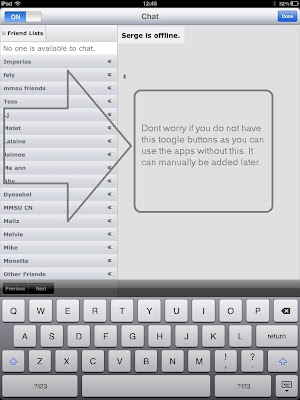
I haven't been using the iPad for a while to access FB, neither by using the default application or either by the customised aps to access FB contents, specially the chat function. Just recently I've found out that the FB's native application for iPAD already has a chat function on it.

 The updated native iPAD FB  app is neater , the interface is easier to follow and navigate. It's chat function is somewhat hidden, and  only is available on the landscape mode. If an iPAD user rarely use the device in the landscape mode, he surely will not know FB chat in official application.

Screen shots below.

At portrait mode, tapping the the menu button, squared with green box, will only show the sub menus at the left. and will not allow you to scroll left.


From the portrait mode, rotate your device into the  landscape mode and scroll the page to the left and the chat button will be shown on the left.


Pressing the box with the arrow will get you online.


And your online friends will be shown ready to chat!


 Buy IPAD now and pay in 2012 at 
PC World from £399.00

Buy IPAD accessories at 
Carphone Warehouse

Did you think you can not get an IPAD 2 as a free gift with a mobile contract? Yes you can, use the gift search from this blog and click high llighted bottom text to see all free gifts offered.


http://prakticality.blogspot.com/p/mobiles.html


Previous related posts

http://prakticality.blogspot.com/2011/05/facebook-chat-at-ipad.html
http://prakticality.blogspot.com/2011/10/facebook-chat-for-ipad-update.html
http://prakticality.blogspot.com/2011/07/how-to-facebook-video-chat.html


Monday, 10 October 2011

Facebook Chat For IPAD Update


I do not know what's happening with FB, they change the interface quite often. Not only the users are somewhat lost on the new arrangements, even specialized programs to access it in some devices like iPAD is somewhat can not cope up with the changes.

On IPAD, chat function can not be found in the native FB official application or even the built in browser. Friendly for facebook was a solution, click here to see previous post, but with all these changes, this app for FB on IPAD seems lost it's touch on FB's chat function. It became unpredictable, sometimes it can get through but takes sometime to connect but most of the time it can't or perhaps I lost patient in waiting and decide to close the application.

Good news is there are many free and new release apps out there that has this function. This new one which was just published this September works like a charm. Welcome Plus for Facebook free for iPAD. Just search for it at the apps page.


The interface is rather cleaner than the native iPAD application for FB. The navigation and menu is most to the left side of the screen and the chat function is at the bottom most right. Just tap at the rather little icon and  menu to go online will pop out.


Once online, list of friend who are online will be lit up with green dot and just tap your friends name you want to chat with and chat window will appear.


To go off line, just tap the online button and you can change your status or completely go offline!


Saturday, 24 September 2011

How to use find my mobile on iPhone or iPad

There's an aplication on iPhone  and iPad that can track the location of your device, just in case it got lost or stolen. This app lets you know where your device is at real time, provide your device is turned on or online. You can also send a message to the device, lock it up, especially when got stolen, or wipe out the contents you have put into your iTunes account access. It is easy and straight forward. Here's how!

1. In your device set up mobile me by going to SETTINGS, MAIL CONTACTS CALENDAR, then ADD ACCOUNT


2. Choose Mobile Me


 3. Set up account using your iTunes account


4. Go to your email for itune's log in and verify your account by clicking the verify button


5. Go back to your iPhone and turn on FIND MY IPHONE


6. In your computer, go to https://me.com and log in to using your iTunes account, the next page will show the devices connected to your account which are "online" at the moment.


7. Click on the device you want to locate, it's location will be shown and you can choose to  send a message or wipe out it's data and lock it in case it is stolen. In this case I've chosen to send a message


8. There will be a confirmation when the message is sent and your device will make a sound for at least 2 minutes while the message is shown on the screen as an urgent message.


Same instructions when you have iPAD assuming you have created your account at me.com

1. FIND, CREATE MESSAGE,


2.MESSAGE SENT


Wednesday, 21 September 2011

How to stream videos from laptop to iPhone

Yes you can stream your videos from laptop , pc, mac, or macbooks to your ipad, iphone, or ipod using your wireless home router! Both devices should be connected wirelessly with the same wi-fi hotspot or router.  It is easy and most of all it is free. From set up to streaming took me 10 minutes or less using an iphone and a Windows Vista laptop.


Here's how it is done.

1. On your laptop, pc or mac machine, go to http://hobbyistsoftware.com/vlcstreamer and choose the  VLC helper software compatible to your device. In this case I have chosen Windows version.


2. Once downloaded and installed, you will see the icon of the software at the bottom right corner of your laptop

And if you click on it, server running should be ticked.


3. On your iphone, ipad or ipod download software called VLC streaming. Just search for "VLC streaming free" from itunes.


4. After initializing the software, it will ask you to enter your email 


5. After pressing OK, you should be able to see your laptop which the VLC helper is running as a server.
6. Tap the device name and tap ADD A MOVIE


6. The VIDEOS directory from your computer will show and you can choose the folder and the movies within the folder to stream, in this case Johnny English!

This is the same file from my laptop


7. Then from your iphone, you need to determine the streaming properties of the movie, which in this case I've chosen low quality and resolution. Then press watch and then wait for the movie to start streaming!


8. After a while I am enjoying Johnny English on my iPhone!

Tuesday, 2 August 2011

iPAD: Crashing Safari and FaceBook Application

I have not used the iPAD for a while and noticed that SAFARI randomly crashes and closes, leaving a blank black screen. Whether you are at youtube, watching movies on other sites, or on facebook.  It can be fired back again though.  My wife confirmed this happening from time to time, and even the facebook apps does the same.  Other apps that do not require internet connection do not have any problem.

The Suspects and Ultimate Fix.

1.Internet Connection

As the apps with the problem use the internet, internet connection was my first suspect.  The antenna of my router falls to either side sometimes. I tightened it up to keep it straight.  It was not resolved. Could it be my  internet provider giving me dropped signals?  I went  to the routers utility to see if there’s a drop in  the traffic  provided by my ISP(usually by typing at any browser's address bar  http://192.168.0.1), and looking at the stats, there’s no sign of  slowdown traffic or interrupted service as it has been up for at least 800 hours.


2. Low Memory

I googled if there are other iPAD users that  might  have the same experience, and one user says he suspect a low memory. Freeing memory by closing the apps you might not noticed to be opened might solve the problem. To show the apps running, I double clicked the home botton and at the bottom part, I saw about 8 apps running.  I closed them but the problem still persists.

To close, press the icon until a minus sign appears, then press the minus sign 


3. Clear Safari Cache


It’s been a while since I used it so I thought of cache clogging up the system. I cleared the cache by going to SETTINGS, under GENERAL, choose SAFARI,  then CLEAR CACHE. No joy!


4. Software Update (Ultimate Fix)


Then I noticed  another obvious situation that I have not updated the unit for sometime. After connecting the machine to the  MAC, it detected  a new update. Download and installation took about 45 minutes, and it seems that it solved the problem! 


Why I have not suspected that first and saved two hours tinkering!


Thursday, 26 May 2011

Mobile Internet Connection for iPad Wifi Model


One of the most disappointing feature of the iPAD is it's bluetooth connectivity. It is very temperamental. One time it can connect and pair but most of the time it does not. Many forums say it is easy to pair devices and computers but my experience says otherwise. Another frustrating thing is, when it managed to connect to a device, it can not find any bluetooth service that can be used, like object push, internet teethering, audio device( I am trying to use a garmin navigator), file transfer etc. etc., it is virtually no service offered and provided! What I have not tried is to pair with a keyboard.

Internet Teethering Problem

Out of these dissappointments, the most is lack of support for internet teethering. I can not use iphone to power it's internet connection through bluetooth, as the ipad lacks capability. This is I think a marketing strategy for the iPAD wifi + 3G! Too bad, I thought apple products support each other's capabilities and services.

The Simple Solution

Thanks to a mobile hotspot or wifi device, one can use mobile internet  in an iPAD wifi only model, anywhere. Mobile WiFi is a new way of enjoying mobile broadband on the move. Unlike ’traditional’ mobile broadband deals which connect your laptop to the mobile internet via a dongle plugged into their USB port, mobile WiFi deals still connect to the internet over 3G mobile phone networks but actually create a local WiFi network based on this connection which you connect to via your WiFi enabled device. This means of course that you can still use mobile WiFi to access mobile broadband on your laptop (and you don’t need to install any software this way) but you can also connect multiple devices at the same time - for example a portable media player like an iPod touch, any WiFi enabled mobile phone, or WiFi anabled games system. Prices varies, and can be a pay monthly or pay as you go options.

To see which option is suited to your need, please see the links below:
Carphone Warehouse
Dialaphone
Three Mobile


Tuesday, 17 May 2011

iPAD and iPAD Things

iPAD on EBAY

The featured sellers on this feed are power sellers only, which means from the most trusted eBAYER's only.


Facebook Chat for iPAD


The facebook apps in iPAD has no chat, and even when you use safari, it will not give you the chat facebook utility. The shortcut,  


where the chat utility is, can give you the page but it does not let me log in even how much I tried using the iPAD.

Is there a solution? Can I facebook chat in an iPAD? The answer is yes and it won't cost you anything. Although there is a premium version, the free and basic version brings this as well. The name of the apps is "friendly for facebook". Download and install, and enjoy chatting with your iPAD.

Steps and Screenshots. (just click on the photos for bigger picture)

1. Go to Apps Store and type in friendly for facebook


2. Install the free version and click the icon at the home menu.


3. The log in interface!


4. The facebook chat interface!


5. Your online friends!


6. The browser interface and the location of the chat button!


Video for friendly:


Do you have difficulties using this app on your iPAD? Another alternative that can give you chat function is featured at 

http://prakticality.blogspot.com/2011/10/facebook-chat-for-ipad-update.html
google.com, pub-9356159227116695, DIRECT, f08c47fec0942fa0

ShareThis

Popular Posts